
Swift from Zero to Expert #3: Strings and Characters — much more than text
Unicode scalars, grapheme clusters, why string[0] doesn't exist in Swift, and how Substring shares memory with the original String.
In the previous article we discovered that collections are value types with their content on the heap and the magic of copy-on-write. Today we’ll explore a type that looks simple but hides one of the bravest design decisions in Swift: the String.
Why can’t you write myString[0]? Why is counting characters O(n)? And what does a flag emoji have to do with all of this? The answer to all these questions is the same: Unicode.
Swift chose correctness over convenience. And that decision changed everything you know about strings.
String Literals: creating text
The most straightforward way to create a string is with a literal:
let greeting = "Hello, world"Swift automatically infers the String type. But literals can be more sophisticated than they seem.
Multiline strings
let poem = """ Roses are red, Violets are blue, Swift is amazing, And so are you. """Indentation is controlled by the position of the closing """ — any whitespace before that line is stripped from all lines.
Special characters
let wiseWords = "\"Imagination is more important than knowledge\" - Einstein"let dollarSign = "\u{24}" // $ — Unicode scalar U+0024let blackHeart = "\u{2665}" // ♥ — Unicode scalar U+2665let sparklingHeart = "\u{1F496}" // 💖 — Unicode scalar U+1F496Extended delimiters
// \n is printed literally, not as a line breaklet raw = #"Line 1\nLine 2"#
// If you need interpolation inside extended delimiters:let value = 42let message = #"The answer is \#(value)"#// "The answer is 42"
Extended delimiters (#"..."#) are perfect when your string contains many quotes or backslashes — like regular expressions or JSON.
String is a value type
Worth repeating: String is a struct in Swift. It’s a value type, like Int or Array. And just like Array, it uses copy-on-write — the character buffer lives on the heap, but is only copied when you mutate.
var original = "Hello"var copy = original // They share the same buffer (CoW)copy += ", world" // Now copy has its own buffer// original is still "Hello"Characters: not what you think
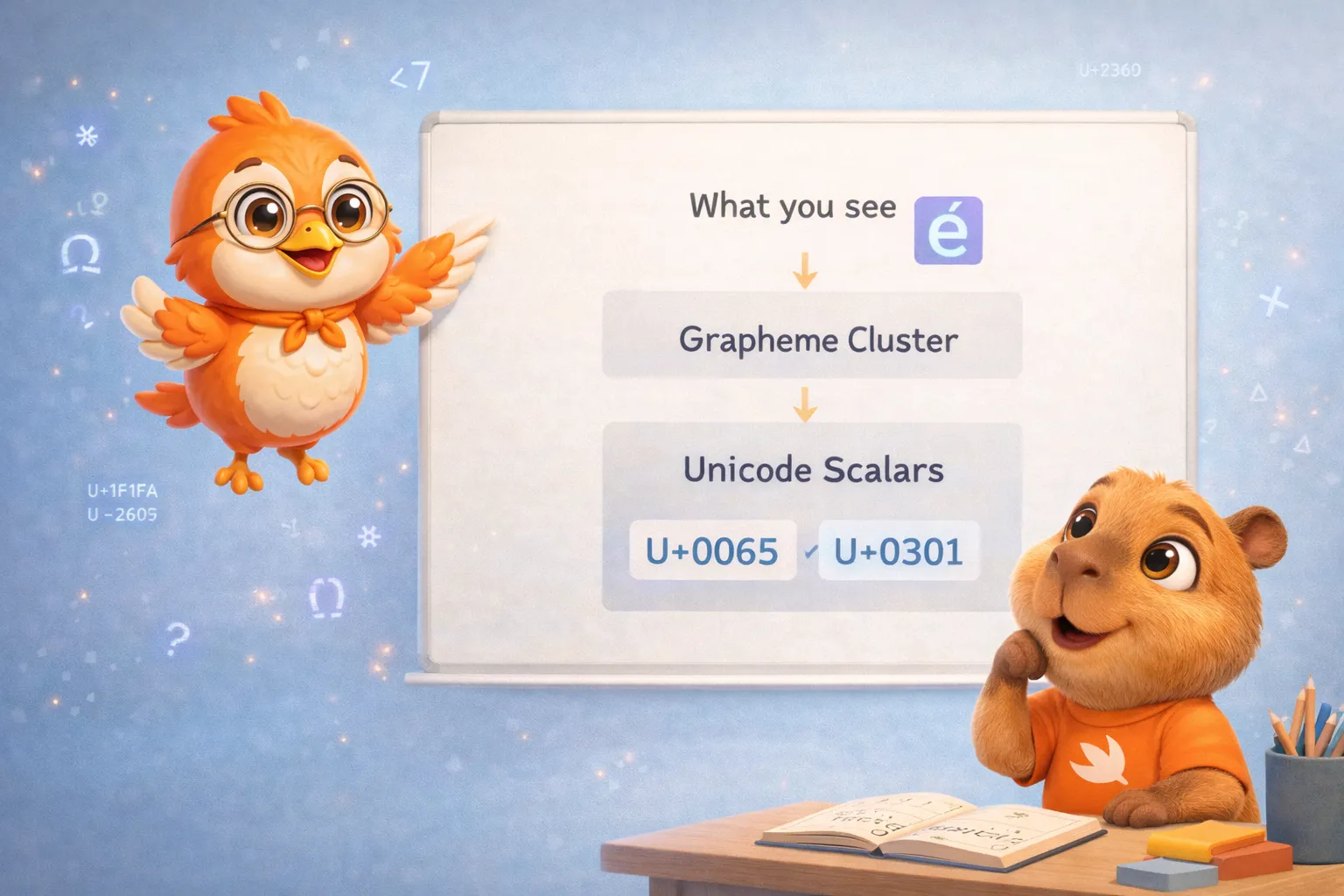
This is where Swift separates itself from most languages. A Character in Swift is not a byte, nor a code point, nor a C char. It’s an extended grapheme cluster — the smallest unit that a human perceives as “one character.”
for character in "Dog!🐶" { print(character)}// D// o// g// !// 🐶So far so normal. But look at this:
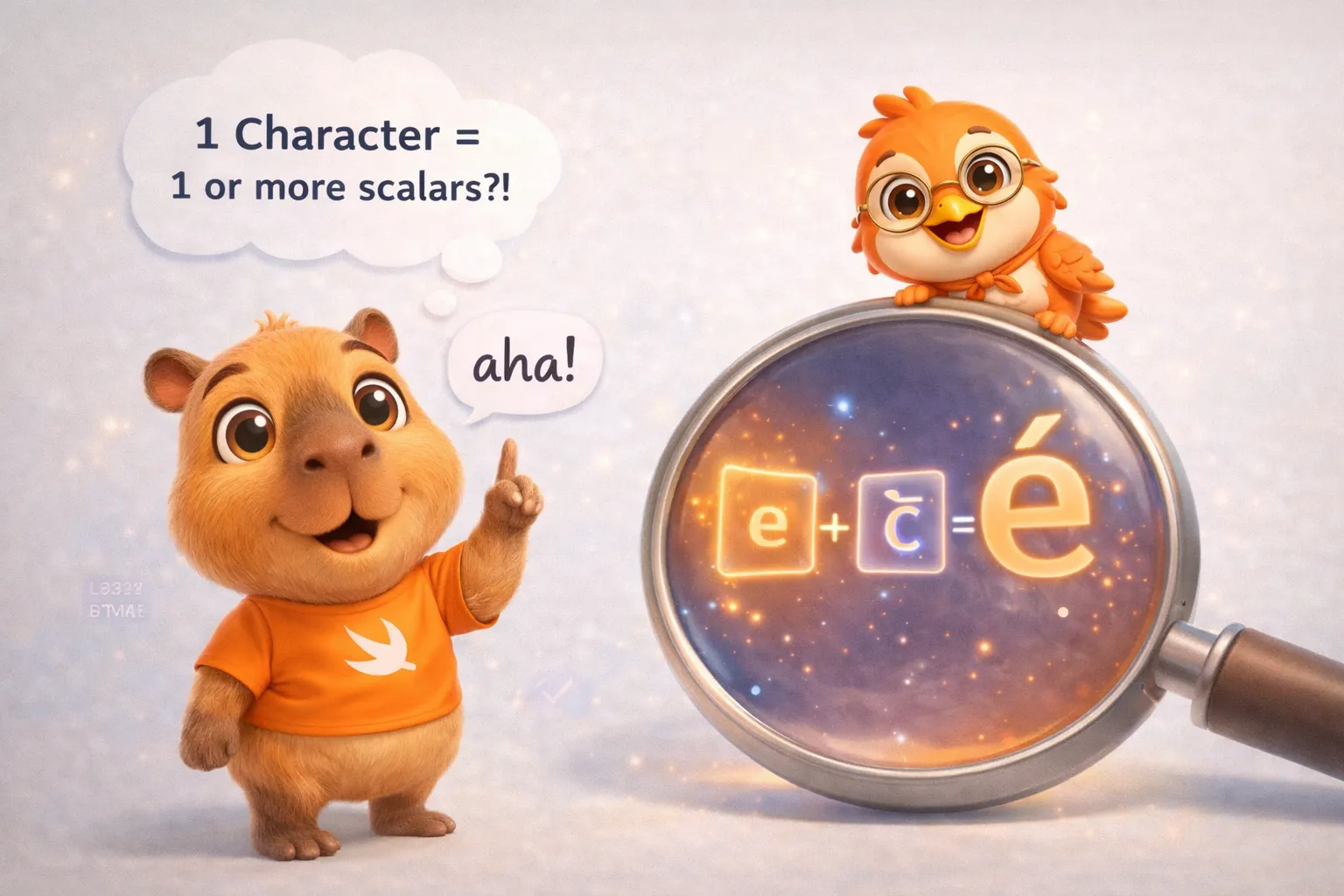
let eAcute: Character = "\u{E9}" // é — one scalarlet combinedEAcute: Character = "\u{65}\u{301}" // e + ◌́ — two scalars// Both are é, both are ONE CharacterThe character é can be represented two ways in Unicode: as a single scalar (U+00E9) or as two combined scalars (e + accent). Swift treats them as the same Character, because visually and linguistically they’re identical.
It gets even more interesting with emojis
let flag: Character = "\u{1F1FA}\u{1F1F8}" // 🇺🇸// Two scalars → one CharacterA country flag is one Character composed of two Unicode scalars (Regional Indicator Symbols). And there’s more:
let family = "👨👩👧👦"print(family.count) // 1// One single Character composed of 7 Unicode scalars!// 👨 + ZWJ + 👩 + ZWJ + 👧 + ZWJ + 👦// ZWJ (Zero-Width Joiner) is an invisible Unicode scalar (U+200D)// that tells the text engine to fuse the surrounding emojis into one glyph.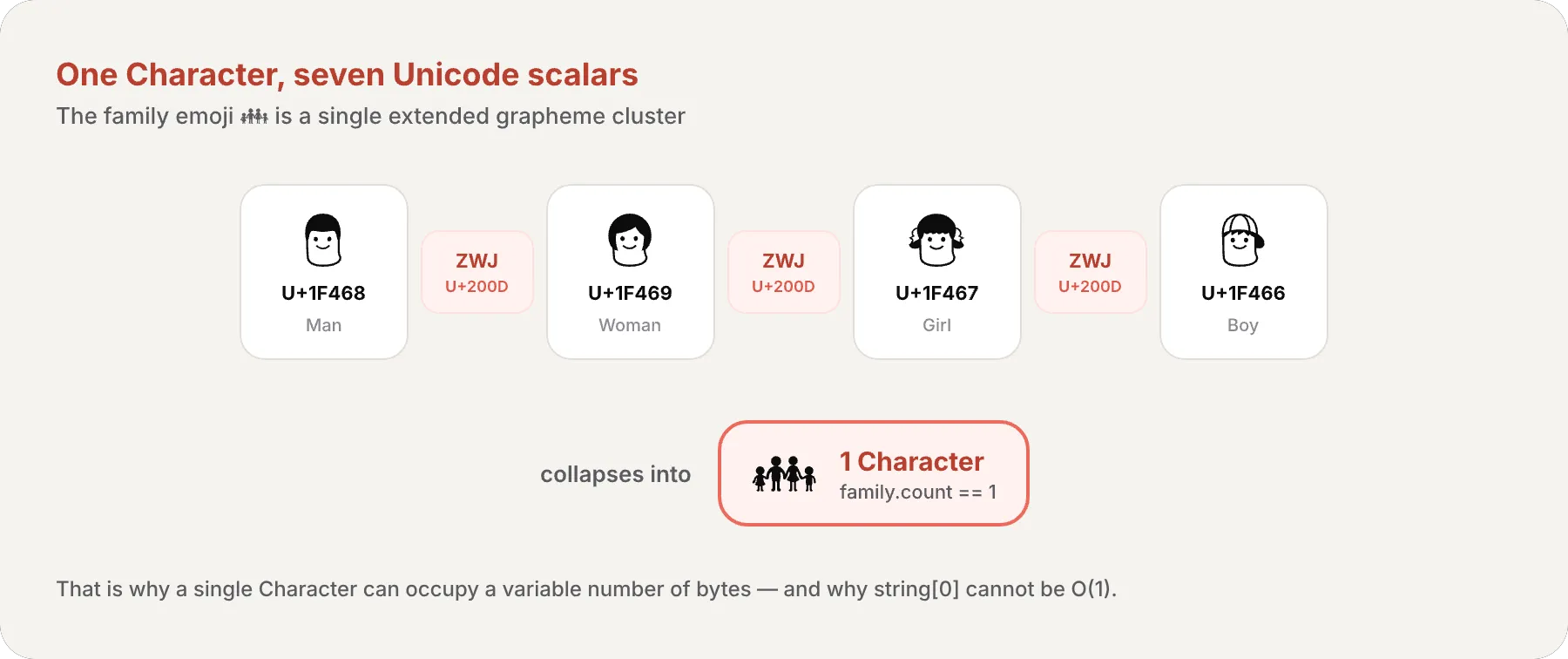
Why string[0] doesn’t exist
In C, char *name = "hello"; name[2] works because each char is exactly 1 byte. Jumping to the third byte is an O(1) operation — you just add 2 to the memory address.
In Swift, that’s impossible. The character é can take 2 bytes or 4 bytes depending on its encoding. A family emoji can take 25 bytes. To find where the third Character starts, Swift has to walk through the first two and count their bytes.
That’s why Swift uses String.Index instead of integers:
let greeting = "Guten Tag!"
greeting[greeting.startIndex] // Ggreeting[greeting.index(after: greeting.startIndex)] // ugreeting[greeting.index(greeting.startIndex, offsetBy: 7)] // agreeting[greeting.index(before: greeting.endIndex)] // !startIndex→ position of the first CharacterendIndex→ position after the last Characterindex(after:)→ next positionindex(before:)→ previous positionindex(_:offsetBy:)→ advance/retreat N positions
Iterating over indices
for index in greeting.indices { print("\(greeting[index]) ", terminator: "")}// G u t e n T a g !Counting characters: O(n) by design
let zoo = "Koala 🐨, Snail 🐌, Penguin 🐧, Dromedary 🐪"print(zoo.count) // 40.count is O(n) — Swift has to walk through the entire string to count extended grapheme clusters. This is a direct consequence of Characters having variable size.
And there’s a case that demonstrates it perfectly:
var word = "cafe"print(word.count) // 4
word += "\u{301}" // Adds COMBINING ACUTE ACCENT
print(word)       // "café"print(word.count) // 4 — still 4!
Adding a combining accent doesn’t add a Character — it modifies the last one. The e and the accent merge into é, a single extended grapheme cluster.
In Swift, a string’s character count isn’t the number of bytes, nor the number of code points. It’s the number of units a human would perceive as “letters.” And that requires walking the entire string.
Modifying strings
Insert and remove
var welcome = "hello"welcome.insert("!", at: welcome.endIndex)// "hello!"
welcome.insert(contentsOf: " there", at: welcome.index(before: welcome.endIndex))// "hello there!"
welcome.remove(at: welcome.index(before: welcome.endIndex))// "hello there"
let range = welcome.index(welcome.endIndex, offsetBy: -6)..<welcome.endIndexwelcome.removeSubrange(range)// "hello"
Concatenation
let start = "hello"let end = " there"var combined = start + end  // "hello there"
combined += "!"             // "hello there!"
let exclamation: Character = "!"combined.append(exclamation)
Interpolation
let multiplier = 3let message = "\(multiplier) times 2.5 is \(Double(multiplier) * 2.5)"// "3 times 2.5 is 7.5"String interpolation is type-safe — the compiler verifies the expression inside \() is valid. No dangerous format strings like C’s printf.
Substrings: sharing to avoid copying
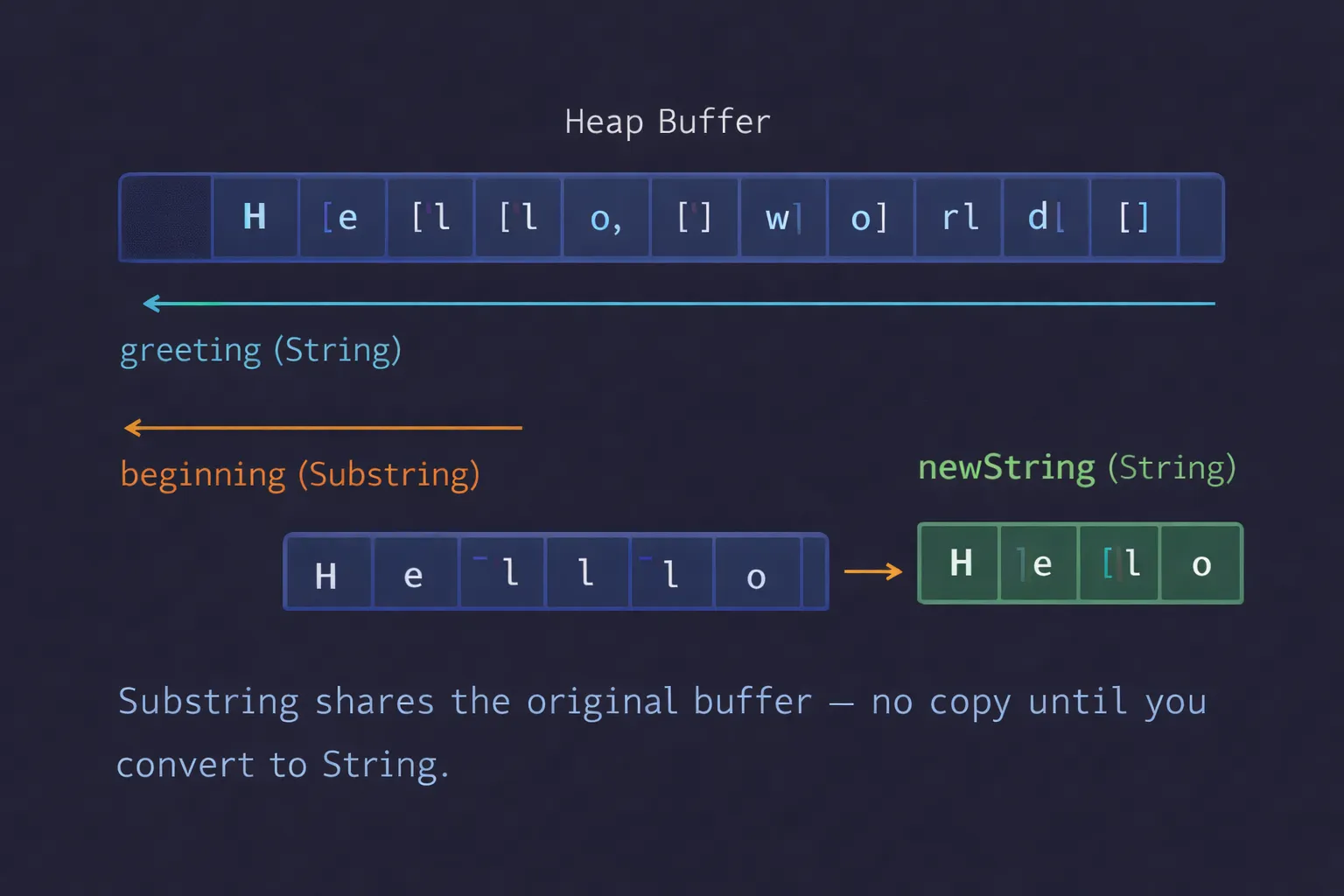
When you get a portion of a string — with a subscript, prefix(_:), or suffix(_:) — Swift doesn’t give you a String. It gives you a Substring.
let greeting = "Hello, world!"let index = greeting.firstIndex(of: ",") ?? greeting.endIndexlet beginning = greeting[..<index] // "Hello" — type is Substring
// For long-term storage, convert to Stringlet stored = String(beginning)
Why? Memory. A Substring shares the buffer of the original String. Nothing is copied. It’s instant.
Comparing strings
let quote = "We're a lot alike, you and I."let sameQuote = "We're a lot alike, you and I."quote == sameQuote // trueComparison in Swift uses canonical equivalence: two strings are equal if they represent the same text, even if they’re composed of different Unicode scalars:
let eAcuteQuestion = "Voulez-vous un caf\u{E9}?"         // é as one scalarlet combinedQuestion = "Voulez-vous un caf\u{65}\u{301}?" // e + ◌́
eAcuteQuestion == combinedQuestion // true — same visual representation
You also have prefix and suffix matching:
let filename = "report-2026-Q1.pdf"filename.hasPrefix("report") // truefilename.hasSuffix(".pdf") // trueUnicode representations
The same string can be viewed differently depending on the encoding:
let dogString = "Dog‼🐶"
// UTF-8 — 8-bit bytesfor byte in dogString.utf8 {    print("\(byte) ", terminator: "")}// 68 111 103 226 128 188 240 159 144 182
// UTF-16 — 16-bit code unitsfor unit in dogString.utf16 {    print("\(unit) ", terminator: "")}// 68 111 103 8252 55357 56374
// Unicode Scalars — 21-bit valuesfor scalar in dogString.unicodeScalars {    print("\(scalar.value) ", terminator: "")}// 68 111 103 8252 128054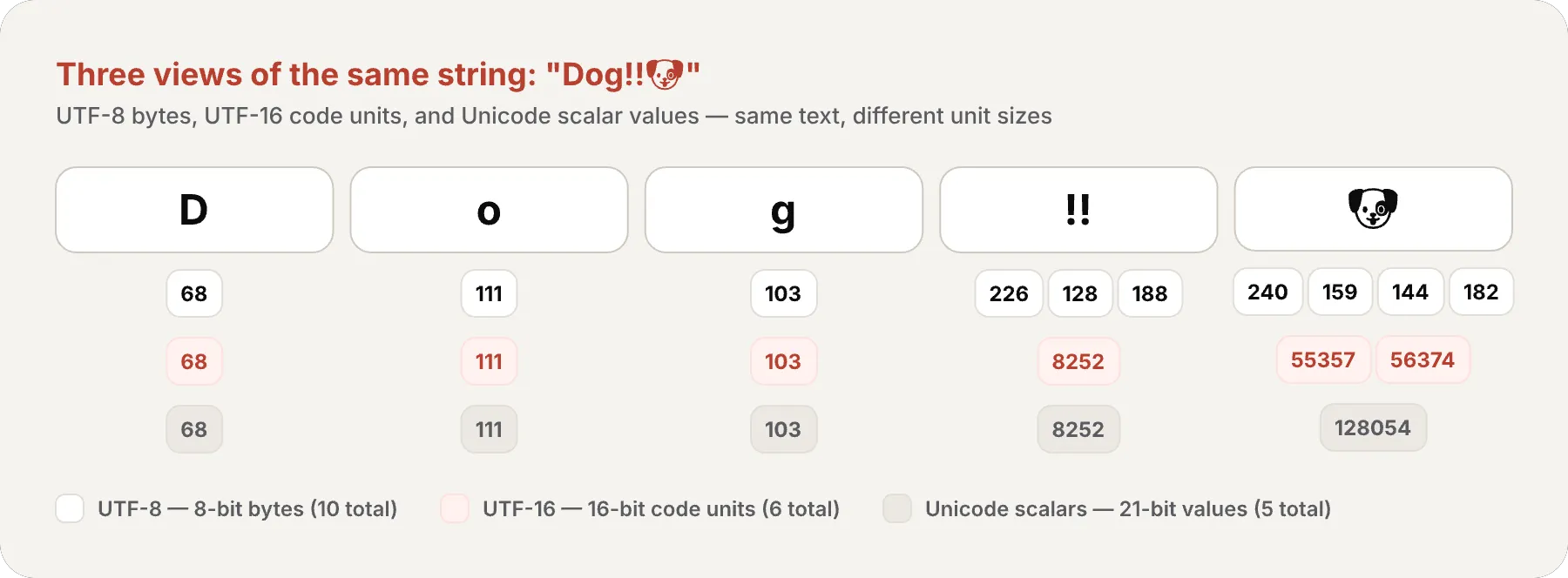
.utf8→ C interoperability, networking, files.utf16→ Foundation/NSString interoperability.unicodeScalars→ Low-level Unicode processing.count(Characters) → What the user sees and expects
The memory behind String
Everything we’ve covered has direct implications on how Swift manages strings in memory.
Small String Optimization
For short strings (15 bytes or fewer on 64-bit platforms), Swift stores the characters directly in the struct, without hitting the heap. This eliminates dynamic allocation for most common strings — variable names, country codes, short labels.
let short = "Hello" // 5 bytes — fits inline, no heap allocationlet long = String(repeating: "x", count: 100) // 100 bytes — goes to the heap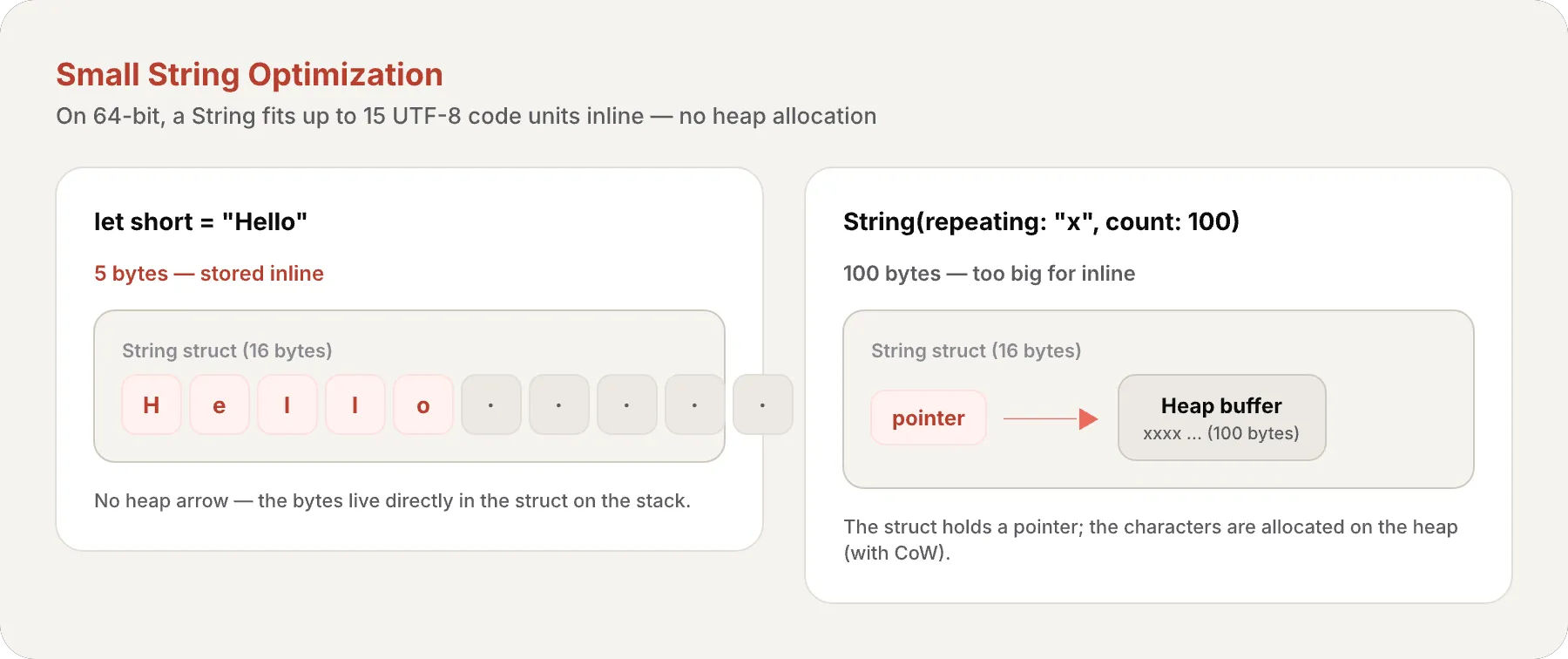
The cost of each operation
count→ O(n) — walks all grapheme clustersstartIndex,endIndex→ O(1)index(after:)→ O(1) per grapheme clusterindex(_:offsetBy: k)→ O(k) — walks k positions- Index access
string[i]→ O(1) if you already have the index hasPrefix,hasSuffix→ O(n) of the prefix/suffix==→ O(n) — must verify canonical equivalence- Concatenation
+→ O(n) — copies both buffers
Recap
Today we discovered why String in Swift is much more than “text”:
- String Literals — simple, multiline, extended delimiters, type-safe interpolation
- Value Type with CoW — value-type struct; character buffer on the heap (unless the string is short enough for Small String Optimization — then bytes live inline in the struct), copy-on-write
- Characters = Extended Grapheme Clusters — what a human perceives, not bytes
- String.Index — why
string[0]doesn’t exist and how to navigate correctly - count is O(n) — direct consequence of variable-size Characters
- Substring — shares the original’s buffer to avoid copies
- Canonical equivalence —
é==e+◌́in comparisons - Small String Optimization — short strings avoid the heap
- UTF-8, UTF-16, Unicode Scalars — three ways to view the same text
Swift made the hard choice with strings: be correct always, even if it means string[0] can’t exist. That same philosophy — correctness over convenience — is what makes the language exceptional.
What’s next
In the next article we’ll explore control flow: if/else, switch with exhaustive pattern matching, guard as an early exit philosophy, and how the compiler turns your switches into efficient jump tables. We’ll see how the decisions you make in each if and switch speak directly to the compiler.
See you next week.
Understanding how Swift handles text is understanding its values as a language: correctness first, performance second — and in the end, you get both.
Related
-
- swift
- swift-zero-expert
- swift-fundamentals
Swift from Zero to Expert #15: Opaque & Boxed Protocol Types
The third door out of 'I don't want to name the concrete type'. some hides one concrete type while keeping its identity — no box, compile-time. any erases the type into a runtime box. This is how you finally return a protocol that has an associatedtype.
-
- swift
- swift-zero-expert
- swift-fundamentals
Swift from Zero to Expert #14: Generics
One swapTwoValues, one Stack<Element>, one findIndex — written once, working for every type. Generics let the caller pick the concrete type, the compiler specialize the code, and the box from #13 disappear. Array, Dictionary, Optional, and Result were generic all along.
-
- swift
- swift-zero-expert
- swift-fundamentals
Swift from Zero to Expert #13: Protocols
A protocol is a contract, not a class. It says what a type must do without saying what it is — and that single idea powers delegation, synthesized Equatable, existentials, and the protocol extensions that make Swift idiomatic.