
Swift Zero to Expert #9: Properties, methods, and subscripts
Stored vs computed properties, observers, lazy, static. How properties define the memory layout and why computed = zero storage.
In the previous article we discovered that structs live on the stack and classes on the heap. Today we dive into the connective tissue of both: properties, methods, and subscripts — the pieces that define what your type knows, what it can do, and how you access its data.
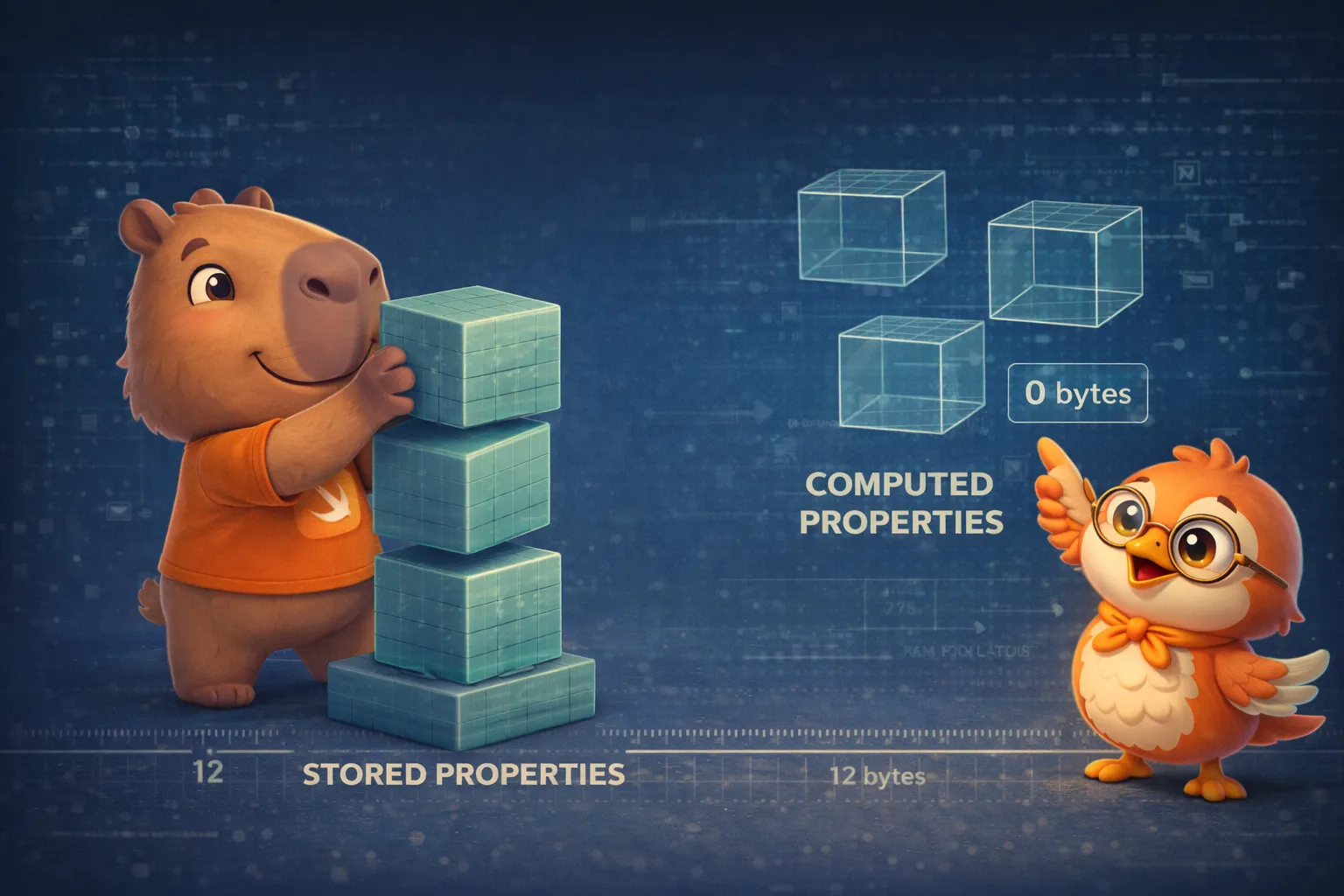
Not all properties cost the same. A stored property takes up real space in your type’s memory layout. A computed property doesn’t take a single byte — it’s a function disguised as a property. Understanding that difference is the key to designing efficient types.
A stored property occupies real bytes in every instance. A computed property occupies zero — it’s simply a function with property syntax.
Stored properties: the real data
struct FixedLengthRange {    var firstValue: Int   // 8 bytes — stored    let length: Int       // 8 bytes — stored (inmutable)}
// MemoryLayout<FixedLengthRange>.size == 16 bytes (8 + 8)var range = FixedLengthRange(firstValue: 0, length: 3)range.firstValue = 6  // OK — var// range.length = 4   // ERROR — let es inmutable
Remember from article #8: if the struct is assigned to a let constant, none of its properties can change — not even the var ones:
let fixedRange = FixedLengthRange(firstValue: 0, length: 3)// fixedRange.firstValue = 6 // ERROR — todo el struct es inmutableWith classes it’s different — let only protects the reference, not the object:
class SomeClass { var value = 42}let instance = SomeClass()instance.value = 99 // OK — let protege la referencia, no las propiedadesLazy stored properties: deferred allocation
class DataManager {    lazy var importer = DataImporter()    var data: [String] = []}
let manager = DataManager()// importer NO se ha creado todavía — zero costo hasta que lo necesitesmanager.data.append("Some data")
print(manager.importer.filename)// AHORA se crea DataImporter — solo cuando realmente lo necesitas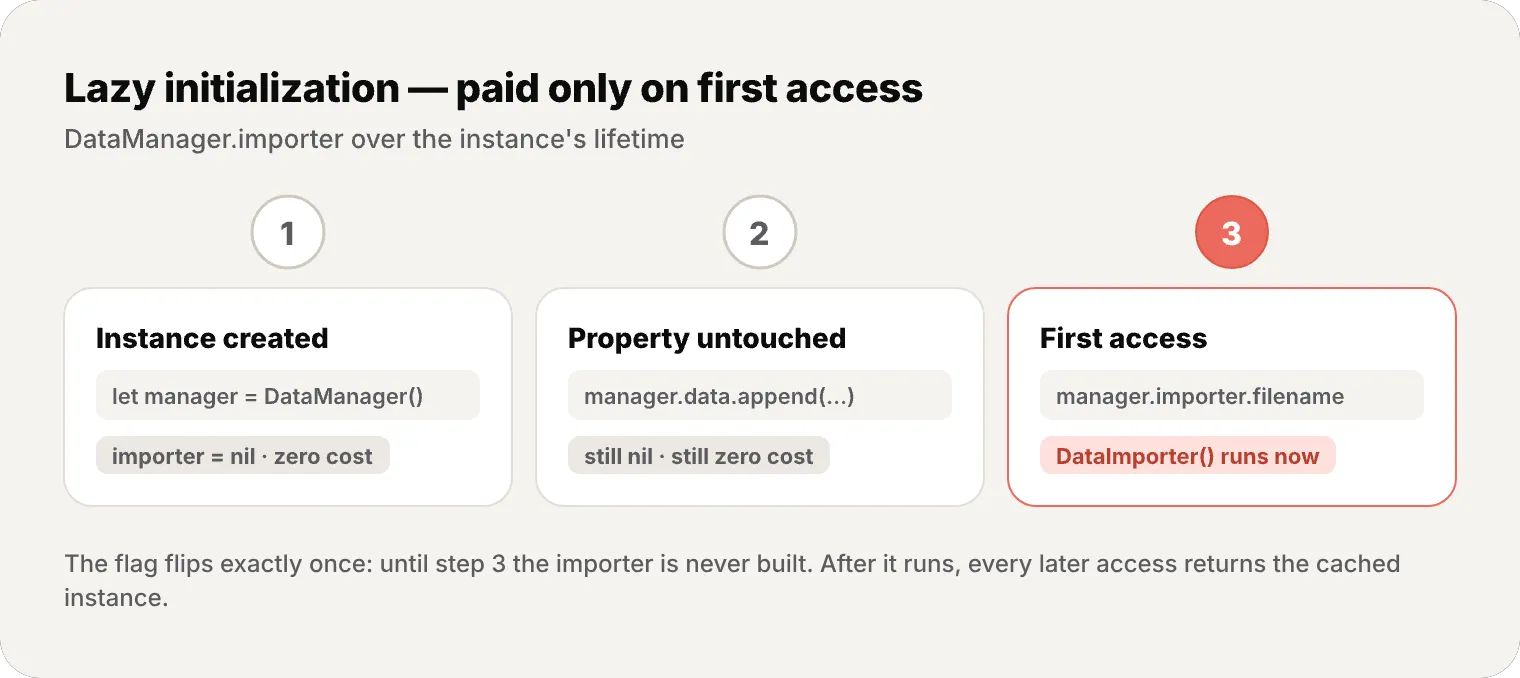
When should you use lazy?
- The value depends on external factors not known until after
init - The initial computation is expensive and may never be needed
- The property depends on
self(which doesn’t exist during initialization)
Computed properties: functions in disguise
struct Rect {    var origin: Point    var size: Size
    var center: Point {        get {            Point(                x: origin.x + (size.width / 2),                y: origin.y + (size.height / 2)            )        }        set {            origin.x = newValue.x - (size.width / 2)            origin.y = newValue.y - (size.height / 2)        }    }}
var square = Rect(    origin: Point(x: 0, y: 0),    size: Size(width: 10, height: 10))print(square.center)        // Point(x: 5, y: 5)square.center = Point(x: 15, y: 15)print(square.origin)        // Point(x: 10, y: 10)
center takes up no space — it’s computed every time. If you only have a getter, you can simplify:
struct Cuboid {    var width = 0.0, height = 0.0, depth = 0.0
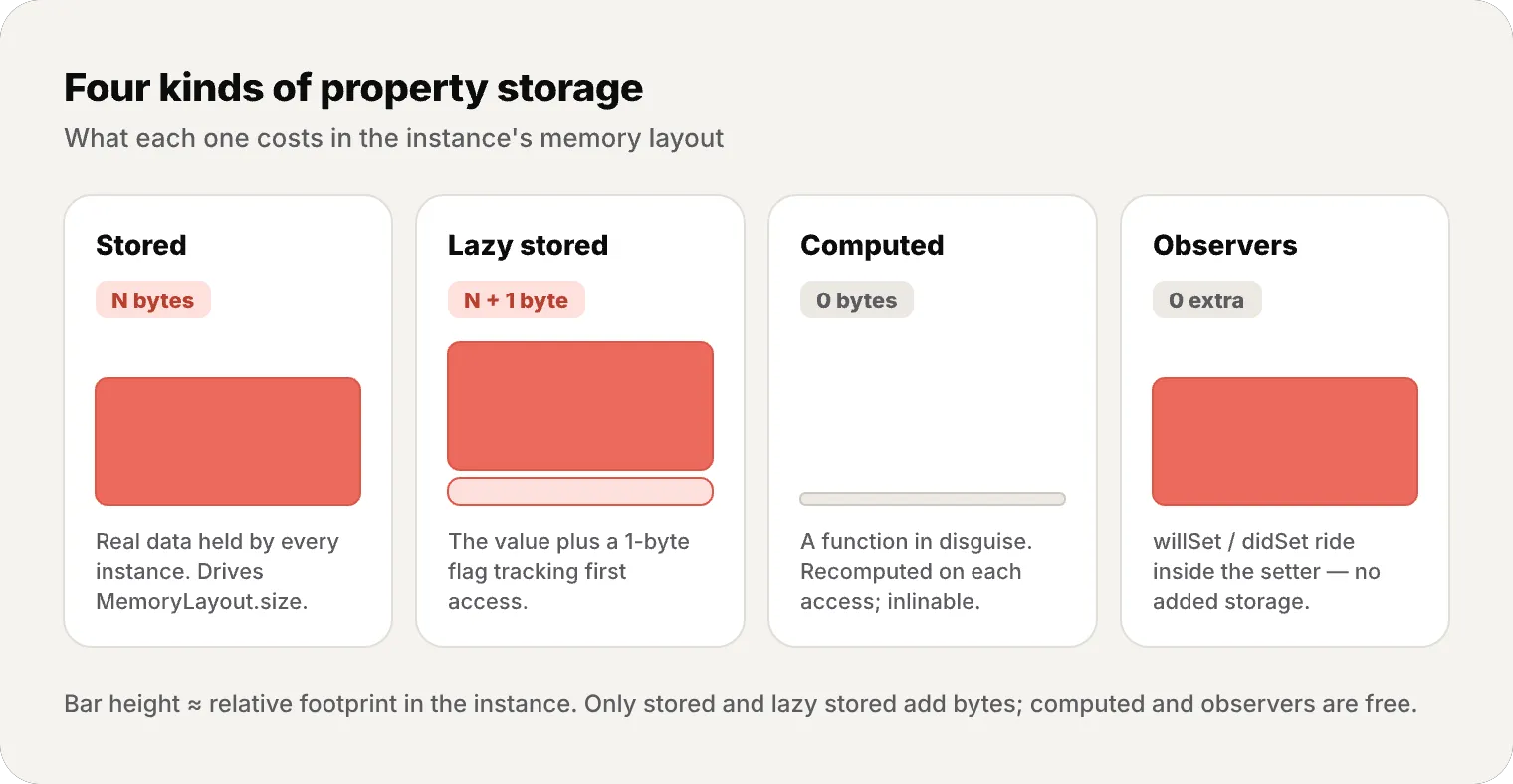
var volume: Double { // read-only computed width * height * depth }}- Stored property → occupies real bytes in every instance. Determines
MemoryLayout.size - Computed property → zero bytes. It’s a function the compiler can inline
- Lazy stored → occupies bytes for the value plus a small amount of extra state to track whether it has been initialized (implementation-defined)
- Compiler trick: if a computed property is simple enough, the compiler inlines it (inline = the compiler pastes the function body directly at the call site, eliminating the function-call overhead) — equivalent to accessing the field directly
Property observers: willSet and didSet
class StepCounter {    var totalSteps: Int = 0 {        willSet(newTotalSteps) {            print("A punto de cambiar a \(newTotalSteps)")        }        didSet {            if totalSteps > oldValue {                print("Agregaste \(totalSteps - oldValue) pasos")            }        }    }}
let counter = StepCounter()counter.totalSteps = 200// "A punto de cambiar a 200"// "Agregaste 200 pasos"counter.totalSteps = 360// "A punto de cambiar a 360"// "Agregaste 160 pasos"willSetreceives the new value as a parameter (default:newValue)didSethas access to the previous value (default:oldValue)- You can use one, both, or neither
Observers also work on inherited properties — you can add willSet/didSet to a property you inherit from a superclass.
Type properties: static and class
struct AudioChannel {    static let thresholdLevel = 10    static var maxInputLevelForAllChannels = 0
    var currentLevel: Int = 0 {        didSet {            if currentLevel > AudioChannel.thresholdLevel {                currentLevel = AudioChannel.thresholdLevel            }            if currentLevel > AudioChannel.maxInputLevelForAllChannels {                AudioChannel.maxInputLevelForAllChannels = currentLevel            }        }    }}
var leftChannel = AudioChannel()leftChannel.currentLevel = 7print(AudioChannel.maxInputLevelForAllChannels) // 7 — compartidoProperty wrappers: reusable logic
A note before the code: 0...100 is a ClosedRange<Int> — a range including both ends; .lowerBound and .upperBound return its first and last values.
@propertyWrapperstruct Clamped {    var wrappedValue: Int {        didSet { wrappedValue = min(max(wrappedValue, range.lowerBound), range.upperBound) }    }    let range: ClosedRange<Int>
    init(wrappedValue: Int, _ range: ClosedRange<Int>) {        self.range = range        self.wrappedValue = min(max(wrappedValue, range.lowerBound), range.upperBound)    }}
struct Player {    @Clamped(0...100) var health: Int = 100    @Clamped(0...999) var score: Int = 0}
var player = Player()player.health = 150   // se clampea a 100player.health = -10   // se clampea a 0
wrappedValue is the required name Swift looks for: reading or writing player.health goes through the wrapper’s wrappedValue, and @Clamped(0...100) passes 0...100 into the wrapper’s init.
SwiftUI is packed with property wrappers: @State, @Binding, @ObservedObject, @Environment. Now you know how they work under the hood.
Instance methods
Methods are functions that belong to a type:
class Counter {    var count = 0
    func increment() {        count += 1    }
    func increment(by amount: Int) {        count += amount    }
    func reset() {        count = 0    }}
let counter = Counter()counter.increment()counter.increment(by: 5)print(counter.count)  // 6counter.reset()
Every instance method has an implicit self parameter that references the instance. You typically omit it unless there’s ambiguity:
struct Point {    var x = 0.0, y = 0.0
    func isToTheRightOf(x: Double) -> Bool {        return self.x > x  // self.x es la propiedad, x es el parámetro    }}
mutating in structs and enums
As we saw in article #8, value types (structs and enums) need mutating to modify self:
struct Point {    var x = 0.0, y = 0.0
    mutating func moveBy(x deltaX: Double, y deltaY: Double) {        x += deltaX        y += deltaY    }}
// Incluso puedes reemplazar self completamente:enum TriStateSwitch {    case off, low, high
    mutating func next() {        switch self {        case .off:  self = .low        case .low:  self = .high        case .high: self = .off        }    }}
Type methods: static and class
Type methods are called on the type, not on an instance:
struct LevelTracker {    static var highestUnlockedLevel = 1    var currentLevel = 1
    static func unlock(_ level: Int) {        if level > highestUnlockedLevel {            highestUnlockedLevel = level        }    }
    static func isUnlocked(_ level: Int) -> Bool {        return level <= highestUnlockedLevel    }
    // @discardableResult: calling this method and ignoring its Bool return value won't trigger a compiler warning    @discardableResult    mutating func advance(to level: Int) -> Bool {        if LevelTracker.isUnlocked(level) {            currentLevel = level            return true        }        return false    }}
LevelTracker.unlock(2)var tracker = LevelTracker()tracker.advance(to: 2)  // true
In classes, use class func instead of static func when you need subclasses to override it — more on that in #10.
Subscripts: bracket-based access
In the example below, assert(...) crashes during development if its condition is false — here it guards against out-of-range indices:
struct Matrix {    let rows: Int, columns: Int    var grid: [Double]
    init(rows: Int, columns: Int) {        self.rows = rows        self.columns = columns        grid = Array(repeating: 0.0, count: rows * columns)    }
    subscript(row: Int, column: Int) -> Double {        get {            assert(row >= 0 && row < rows && column >= 0 && column < columns)            return grid[(row * columns) + column]        }        set {            assert(row >= 0 && row < rows && column >= 0 && column < columns)            grid[(row * columns) + column] = newValue        }    }}
var matrix = Matrix(rows: 2, columns: 2)matrix[0, 1] = 1.5matrix[1, 0] = 3.2print(matrix[0, 1])  // 1.5
Subscripts can take any number of parameters, be read-only or read-write, and can be type subscripts (static subscript).
Memory: how properties define the layout
A type’s stored properties define its memory layout:
struct UserProfile {    let id: Int            // 8 bytes    var name: String       // 16 bytes (the String struct footprint; its backing character buffer is heap-allocated for larger strings)    var age: Int           // 8 bytes    var isActive: Bool     // 1 byte}                          // + 7 bytes padding to reach the stride
MemoryLayout<UserProfile>.size       // 33 bytes (8 + 16 + 8 + 1)MemoryLayout<UserProfile>.stride     // 40 bytes (con alignment padding)MemoryLayout<UserProfile>.alignment  // 8 bytes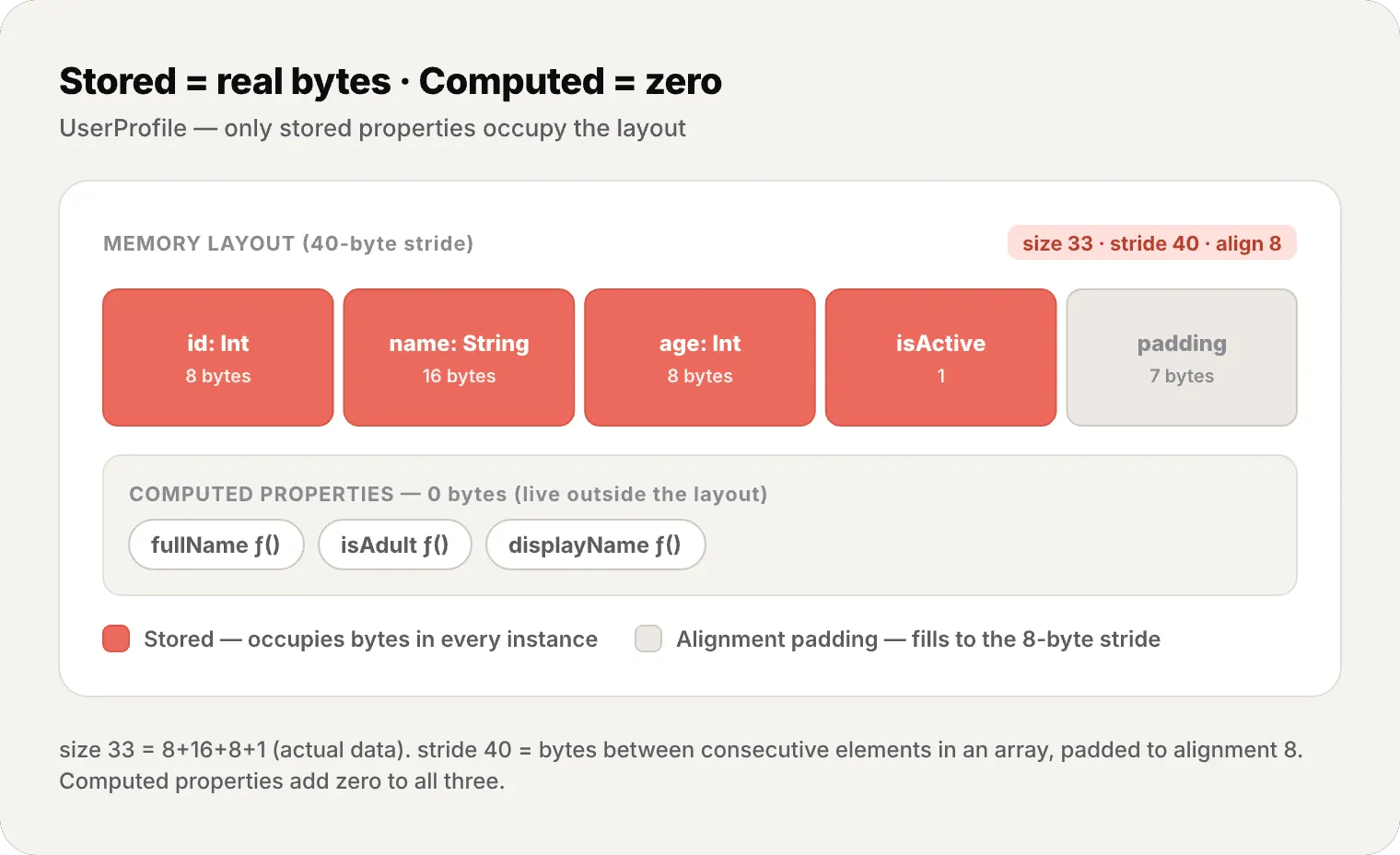
Computed properties don’t appear in the layout. No matter how many computed properties you have, the type’s size doesn’t change:
struct Circle {    var radius: Double  // 8 bytes — la ÚNICA propiedad que ocupa espacio
    var diameter: Double { radius * 2 }         // 0 bytes    var circumference: Double { .pi * diameter } // 0 bytes    var area: Double { .pi * radius * radius }   // 0 bytes}
MemoryLayout<Circle>.size  // 8 bytes — solo radius
Design your types by thinking about what needs to be stored (real data that changes and must persist) versus what can be computed (derived from other data). Fewer stored properties = less memory per instance.
Recap
- Stored properties — real data, occupy bytes in the memory layout
- Computed properties — functions in disguise, zero storage, can be inlined
- Lazy properties — allocated on demand, useful for expensive objects
- Property observers — willSet/didSet, add no storage, SE-0268 optimizes oldValue
- Type properties —
static, one shared copy, initialized exactly once even across threads (viaswift_once) - Property wrappers — reusable logic with
@, the foundation of SwiftUI - Instance methods — implicit
self,mutatingfor value types - Type methods —
static func/class func, called on the type - Subscripts — bracket access with
[], like computed properties for collections - Memory layout — only stored properties define the size; computed = free
What’s next
In the next article we explore Inheritance, Initialization, and Deinitialization — the trinity that defines the lifecycle of classes. We’ll cover designated vs convenience initializers, two-phase initialization, failable init, and deinit — the final act before ARC reclaims the memory.
See you next week.
Properties are the DNA of your types. Stored properties define what your type knows — and how much memory it consumes. Computed properties define what it can derive — at zero cost. Design your types with that distinction in mind.
References
Related
-
- swift
- swift-zero-expert
- swift-fundamentals
Swift from Zero to Expert #15: Opaque & Boxed Protocol Types
The third door out of 'I don't want to name the concrete type'. some hides one concrete type while keeping its identity — no box, compile-time. any erases the type into a runtime box. This is how you finally return a protocol that has an associatedtype.
-
- swift
- swift-zero-expert
- swift-fundamentals
Swift from Zero to Expert #14: Generics
One swapTwoValues, one Stack<Element>, one findIndex — written once, working for every type. Generics let the caller pick the concrete type, the compiler specialize the code, and the box from #13 disappear. Array, Dictionary, Optional, and Result were generic all along.
-
- swift
- swift-zero-expert
- swift-fundamentals
Swift from Zero to Expert #13: Protocols
A protocol is a contract, not a class. It says what a type must do without saying what it is — and that single idea powers delegation, synthesized Equatable, existentials, and the protocol extensions that make Swift idiomatic.