Swift from Zero to Expert #10: Inheritance & Initialization
Subclassing, overriding, and super. Designated vs convenience initializers, two-phase initialization, failable and required init, and deinit — the full lifecycle of a class, explained in memory.
In the previous article we dissected properties, methods, and subscripts — the connective tissue of every type. Today we tackle the lifecycle of a class from birth to death: how it inherits from another class (inheritance), how it’s brought to life (initialization), and how it’s torn down (deinitialization).
This is a class-only story. Back in #8 we learned that only classes have inheritance, identity, and deinit. Everything here flows from that one fact: a class instance lives on the heap, it can be built on top of another class, and Swift has to guarantee that every stored property — including the ones it inherits — has a valid value before you ever touch the object.
Initialization isn’t “running some setup code.” It’s a contract the compiler enforces: by the time init returns, every stored property holds a real value — no exceptions, no nil-by-accident.
Inheritance: building on top of another class
A class that doesn’t inherit from anything is a base class. Unlike some languages, Swift has no universal root class — your base classes start clean:
class Vehicle {    var currentSpeed = 0.0    var description: String {        "traveling at \(currentSpeed) miles per hour"    }    func makeNoise() {        // do nothing — an arbitrary vehicle doesn't necessarily make a noise    }}
let someVehicle = Vehicle()print(someVehicle.description)// traveling at 0.0 miles per hour
To subclass, write the subclass name, a colon, then the superclass name. The subclass automatically gains everything the superclass has:
class Bicycle: Vehicle {    var hasBasket = false}
let bicycle = Bicycle()bicycle.hasBasket = truebicycle.currentSpeed = 15.0    // inherited from Vehicleprint(bicycle.description)     // also inherited// traveling at 15.0 miles per hour
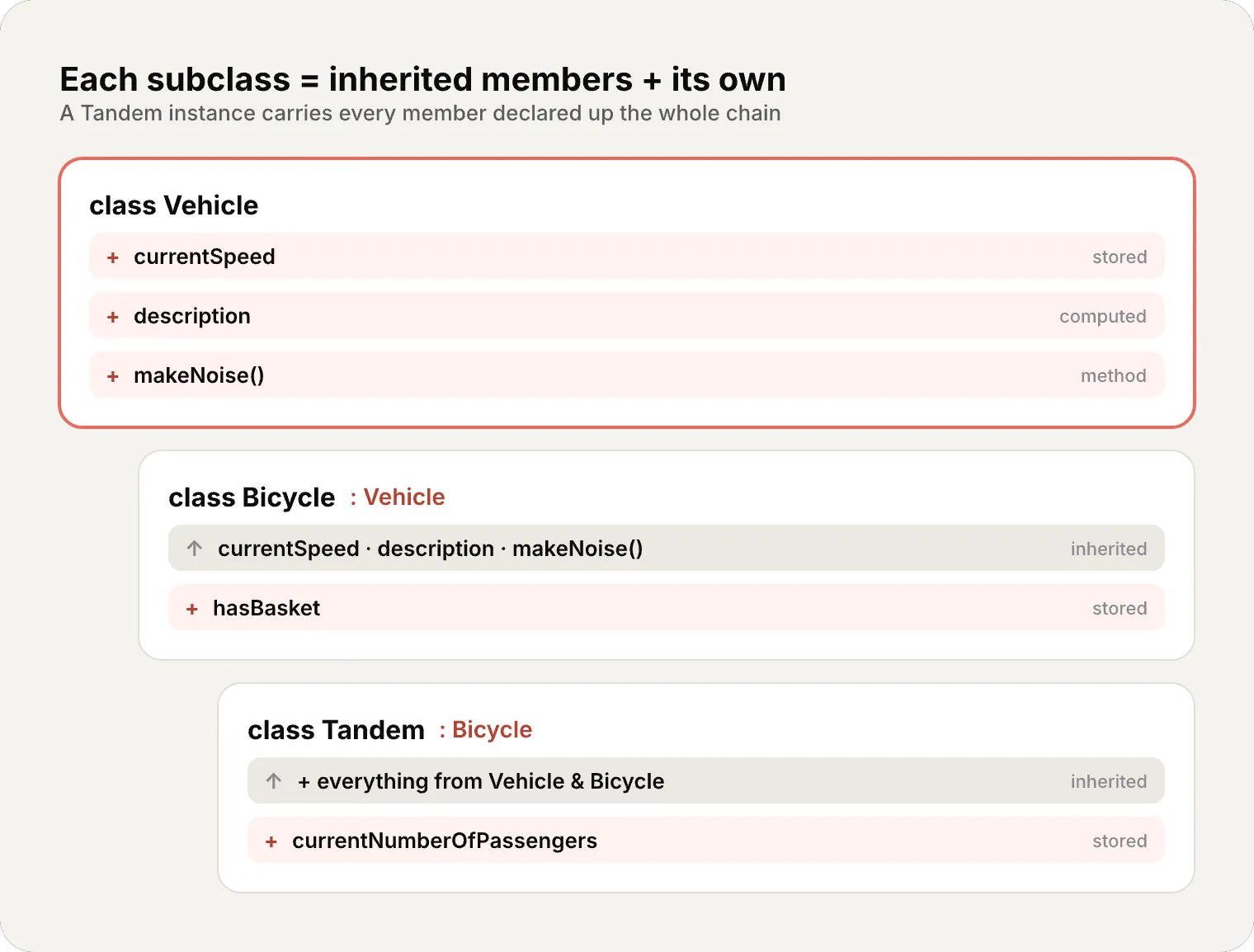
Subclasses can themselves be subclassed — the chain goes as deep as you want:
class Tandem: Bicycle { var currentNumberOfPassengers = 0}Tandem inherits from Bicycle, which inherits from Vehicle. A Tandem instance carries every property and method declared anywhere up that chain.
Overriding: replacing inherited behavior
class Train: Vehicle {    override func makeNoise() {        print("Choo Choo")    }}
let train = Train()train.makeNoise()    // "Choo Choo"
That override keyword is doing real work. Remember from #8: class methods use dynamic dispatch by default — at runtime, Swift consults the vtable to find which implementation to actually run. Overriding is precisely what makes that indirection meaningful: Train’s makeNoise() replaces Vehicle’s entry in the vtable for Train instances.
Calling up with super
Sometimes you want to extend the superclass behavior rather than replace it outright. The super prefix reaches the superclass version of a method, property, or subscript:
class Car: Vehicle {    var gear = 1    override var description: String {        super.description + " in gear \(gear)"    }}
let car = Car()car.currentSpeed = 25.0car.gear = 3print(car.description)// traveling at 25.0 miles per hour in gear 3
Car overrides the read-only computed property description, calls super.description to get the base text, then appends its own. You can override any inherited property with a custom getter (and setter, if appropriate) — a subclass can’t tell whether the inherited property was stored or computed in the superclass; it only knows its name and type.
Overriding observers on inherited properties
You can also bolt property observers onto an inherited property — even if you never declared the property yourself:
class AutomaticCar: Car {    override var currentSpeed: Double {        didSet {            gear = Int(currentSpeed / 10.0) + 1        }    }}
let automatic = AutomaticCar()automatic.currentSpeed = 35.0print(automatic.description)// traveling at 35.0 miles per hour in gear 4final: shutting the door
Mark a method, property, or subscript final to forbid overriding it. Mark the whole class final to forbid subclassing it entirely:
final class APIClient { func fetch() { /* ... */ }}// class CachedClient: APIClient {} // ERROR — APIClient is finalAs we saw in #8, final isn’t just a design tool — it’s a performance tool. With no possible override, the compiler can drop the vtable lookup and use static dispatch, jumping straight to the code.
Initialization: the contract
The iron rule: classes and structures must set all their stored properties to a valid value by the time initialization finishes. There’s no “uninitialized” state you can read by accident.
struct Fahrenheit {    var temperature: Double    init() {        temperature = 32.0    }}
var f = Fahrenheit()print(f.temperature)   // 32.0
If a property has a default value in its declaration, you don’t even need to set it in init — and structs you don’t write an initializer for get a memberwise one for free, exactly as we saw in #8. Classes never get a memberwise init, and now we’re about to see why: inheritance makes class initialization a genuinely harder problem.
Designated vs convenience initializers
Classes have two kinds of initializers, and the distinction is the heart of this whole chapter.
class Food {    var name: String    init(name: String) {              // designated        self.name = name    }    convenience init() {              // convenience        self.init(name: "[Unnamed]")    }}
let bacon = Food(name: "Bacon")   // name is "Bacon"let mystery = Food()              // name is "[Unnamed]"
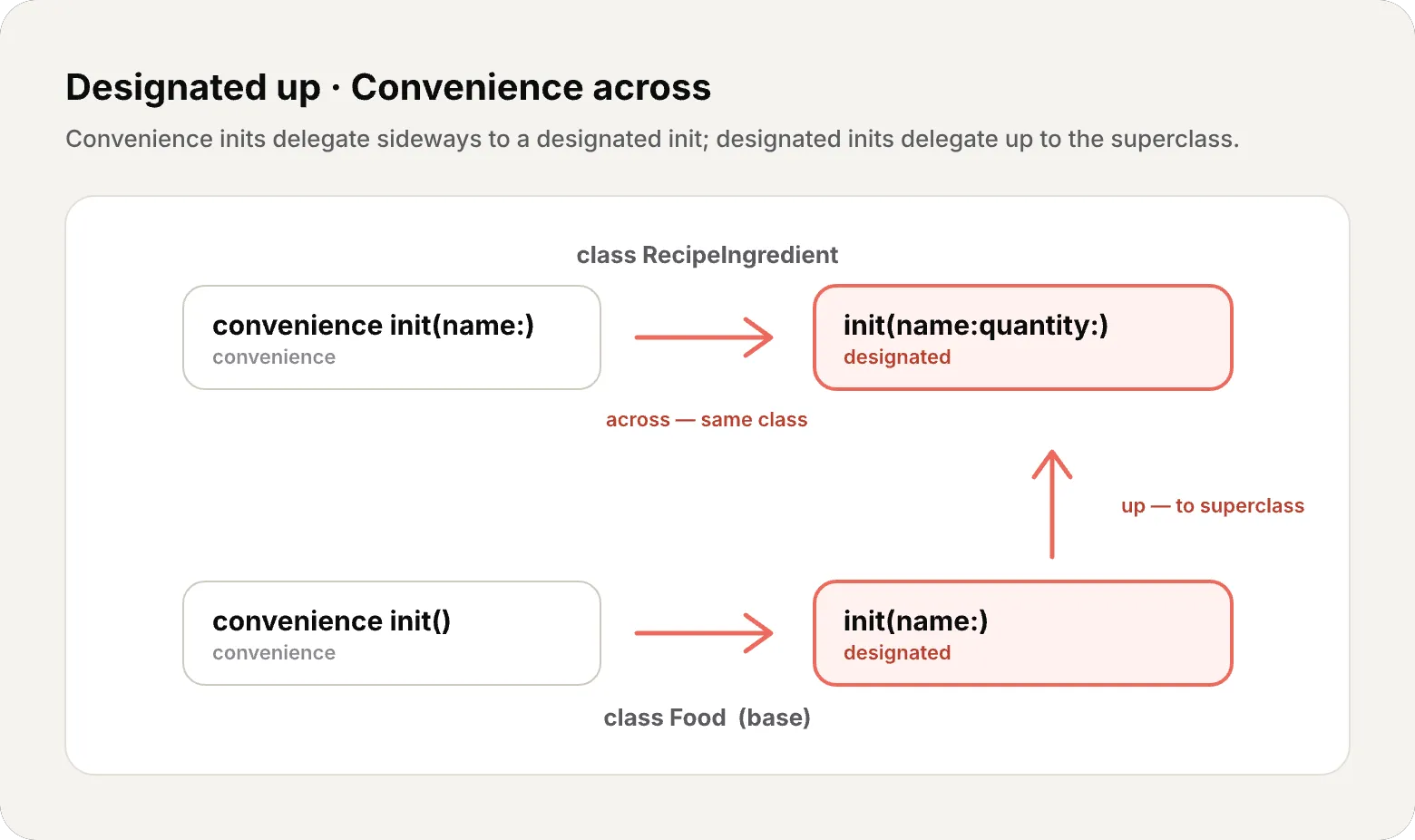
The convenience init() doesn’t touch name directly — it delegates across to the designated init(name:). That delegation is mandatory, and it’s governed by three rules.
The three delegation rules
- Rule 1 — A designated initializer must call a designated initializer from its immediate superclass.
- Rule 2 — A convenience initializer must call another initializer from the same class.
- Rule 3 — A convenience initializer must ultimately call a designated initializer.
The mnemonic the Swift book gives you is worth memorizing:
Designated initializers always delegate up. Convenience initializers always delegate across.
Two-phase initialization: under the hood
Here’s the part that explains why all those rules exist. Class initialization in Swift runs in two phases, and the compiler enforces it.
Why bother? Because of memory safety. A class instance occupies a single heap allocation holding the storage for every class in its chain. Until every one of those slots holds a real value, the object isn’t fully formed — and reading self would mean reading uninitialized memory.
The compiler enforces four safety checks to make this airtight:
- Check 1 — A designated init must initialize all properties its own class introduces before delegating up to
super. - Check 2 — A designated init must delegate up to
superbefore assigning a value to an inherited property (otherwisesuperwould overwrite it). - Check 3 — A convenience init must delegate to another initializer before assigning to any property.
- Check 4 — No initializer can read instance properties, call instance methods, or use
selfas a value until phase 1 is complete.
Let’s watch the phases unfold:
class Bicycle: Vehicle { var hasBasket: Bool init(hasBasket: Bool) { // PHASE 1: set my own property first (safety check 1) self.hasBasket = hasBasket // ...then delegate up (safety check 2) super.init() // PHASE 2: now self is valid — I may read/customize it (safety check 4) currentSpeed = 10.0 // inherited property, safe to touch now }}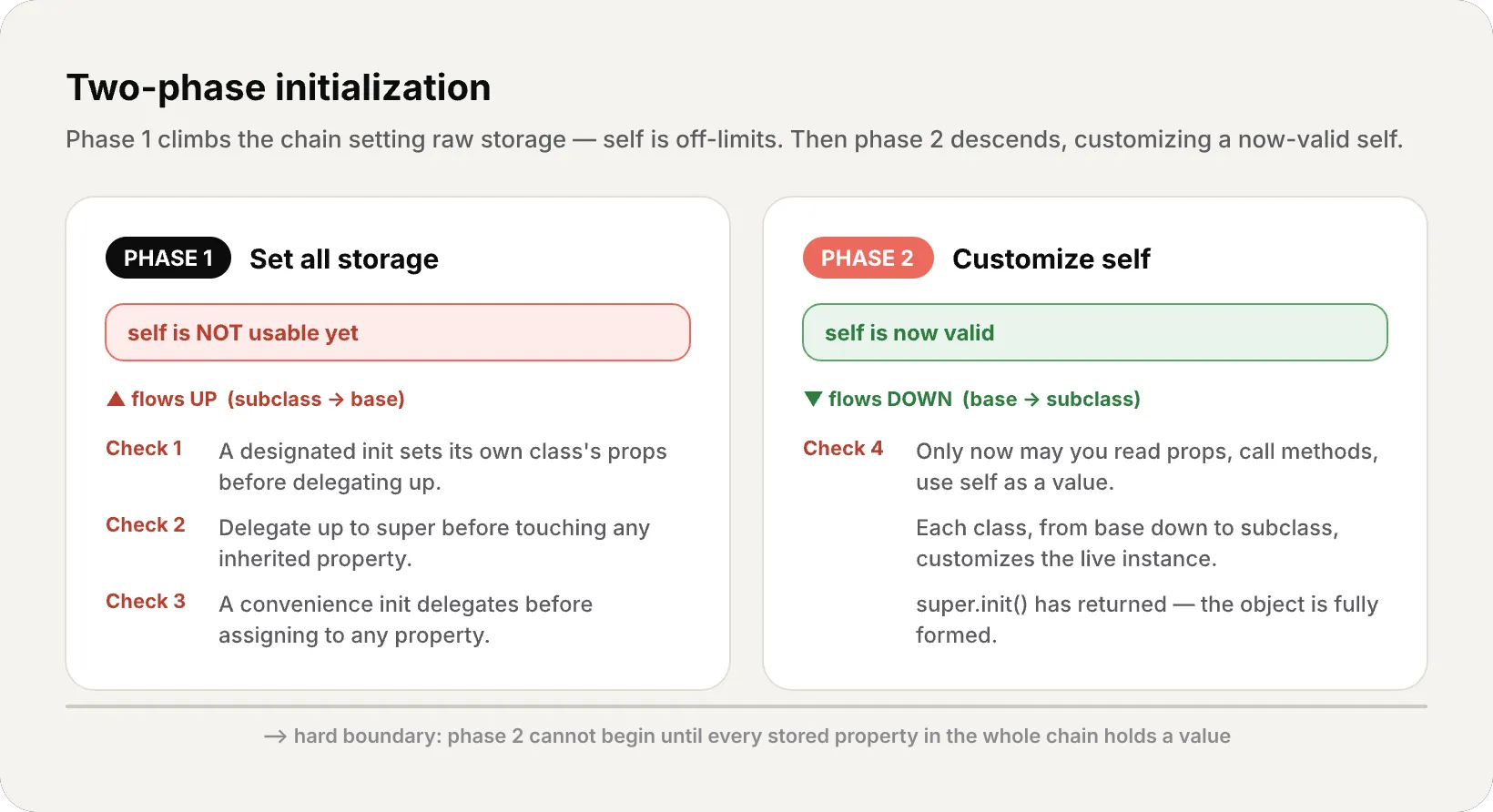
This ordering is exactly what Rules 1–3 guarantee. Phase 1 climbs to the top of the chain setting raw storage; phase 2 descends, and only now is self a real, usable object.
Initializer inheritance and overriding
Here’s a surprise if you come from Objective-C or Java: Swift subclasses do not inherit their superclass initializers by default. This prevents a specialized subclass from being created through a generic superclass initializer that leaves the subclass half-baked.
When you write a subclass initializer that matches a superclass designated initializer, you’re overriding it — so you write override:
class Vehicle {    var numberOfWheels = 0    var description: String { "\(numberOfWheels) wheel(s)" }    // gets a default initializer init() automatically}
class Bicycle: Vehicle {    override init() {        super.init()           // delegate up first        numberOfWheels = 2     // then customize inherited property    }}
print(Bicycle().description) // "2 wheel(s)"Automatic initializer inheritance
Subclasses do inherit superclass initializers automatically — but only when it’s safe. Assuming you give default values to every new property your subclass introduces:
- Rule 1 — If your subclass defines no designated initializers, it inherits all of the superclass’s designated initializers.
- Rule 2 — If your subclass implements all of the superclass’s designated initializers (by inheriting them via Rule 1 or writing them), it also inherits all the superclass’s convenience initializers.
This is why you so rarely have to write boilerplate initializers in practice. Here’s the classic three-level hierarchy from the Swift book that ties it together:
class Food {    var name: String    init(name: String) { self.name = name }       // designated    convenience init() { self.init(name: "[Unnamed]") }}
class RecipeIngredient: Food {    var quantity: Int    init(name: String, quantity: Int) {           // designated        self.quantity = quantity        super.init(name: name)    }    override convenience init(name: String) {     // overrides Food's designated init        self.init(name: name, quantity: 1)    }}
class ShoppingListItem: RecipeIngredient {    var purchased = false   // default value, no init needed    var description: String {        "\(quantity) x \(name)" + (purchased ? " ✔" : " ✘")    }}
RecipeIngredient overrides Food’s designated init(name:) — as a convenience initializer this time — so it gets marked override. Because it now implements all of Food’s designated initializers, it automatically inherits Food’s convenience init(). And ShoppingListItem introduces only a defaulted property and no initializers, so it inherits everything:
let a = ShoppingListItem() // inherited convenience init()let b = ShoppingListItem(name: "Bacon") // inherited, quantity defaults to 1let c = ShoppingListItem(name: "Eggs", quantity: 6) // inherited designated initFailable initializers
Sometimes initialization should be allowed to fail — bad parameters, a missing resource, an invalid state. Write init? and return nil at the failure point. The result is an optional instance.
struct Animal {    let species: String    init?(species: String) {        if species.isEmpty { return nil }        self.species = species    }}
let giraffe = Animal(species: "Giraffe") // Animal? -> not nillet nothing = Animal(species: "") // Animal? -> nilYou’ve already used failable initializers without knowing it. Enums with raw values get init?(rawValue:) for free, and numeric conversions like Int(exactly:) are failable:
let pi = 3.14159let n = Int(exactly: pi) // nil — the value can't be preserved exactlyFailure propagates: if a failable init delegates to another failable init that fails, the whole process aborts immediately:
class Product {    let name: String    init?(name: String) {        if name.isEmpty { return nil }        self.name = name    }}
class CartItem: Product {    let quantity: Int    init?(name: String, quantity: Int) {        if quantity < 1 { return nil }     // fail before delegating up        self.quantity = quantity        super.init(name: name)             // may also fail -> aborts whole init    }}
CartItem(name: "sock", quantity: 2) // CartItem? -> not nilCartItem(name: "shirt", quantity: 0) // CartItem? -> nil (bad quantity)CartItem(name: "", quantity: 1) // CartItem? -> nil (superclass fails on name)Required initializers
Mark an initializer required to force every subclass to implement it. Subclasses write required too (not override) to propagate the requirement down the chain:
class SomeClass {    required init() {        // ...    }}
class SomeSubclass: SomeClass {    required init() {        // subclass must provide this    }}
You can skip writing it explicitly if an inherited initializer already satisfies the requirement. required matters most for protocol conformance (protocols are coming later in the series) and factory-style APIs (code that creates instances for you from a base type) — where the type system needs a guarantee that the initializer exists on every concrete subclass.
Deinitialization: the last act
This is the bookend to everything we’ve covered. Recall from #8: classes live on the heap and are managed by ARC (Automatic Reference Counting). When the last reference to an object disappears — its reference count hits 0 — ARC deallocates it. Just before that happens, your deinit gets one final chance to clean up:
class FileHandle {    let path: String    init(path: String) {        self.path = path        print("Opened \(path)")    }    deinit {        print("Closing \(path)")   // release the resource before deallocation    }}
var handle: FileHandle? = FileHandle(path: "/tmp/data")// "Opened /tmp/data"handle = nil// "Closing /tmp/data" — refcount hit 0, deinit ran, then memory freedThe Swift book’s Bank/Player example shows why this matters — deinit returns a player’s coins to the bank the instant they leave the game:
class Bank {    static var coinsInBank = 10_000    static func distribute(coins requested: Int) -> Int {        let toVend = min(requested, coinsInBank)        coinsInBank -= toVend        return toVend    }    static func receive(coins: Int) { coinsInBank += coins }}
class Player {    var coinsInPurse: Int    init(coins: Int) { coinsInPurse = Bank.distribute(coins: coins) }    deinit { Bank.receive(coins: coinsInPurse) }   // return coins on the way out}
var playerOne: Player? = Player(coins: 100)print(Bank.coinsInBank)   // 9900playerOne = nil           // deinit fires -> coins go backprint(Bank.coinsInBank)   // 10000
init is the handshake that guarantees a valid object. deinit is the farewell that hands back what it borrowed. ARC decides when both happen — you decide what they do.
Memory: the lifecycle in one picture
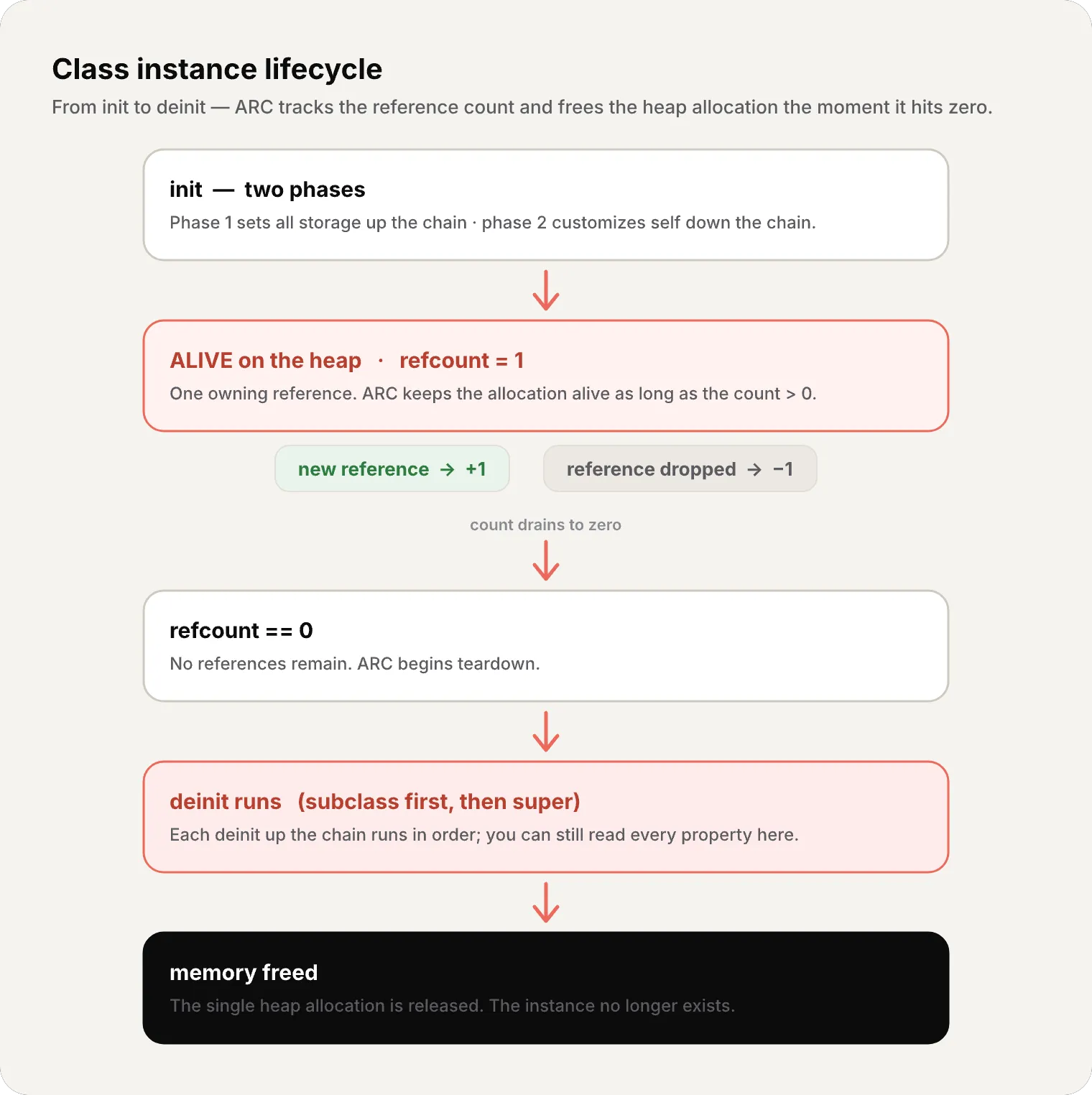
Recap
- Inheritance — only classes have it; a subclass gains everything from its superclass and can add more
- Overriding — replace inherited behavior with
override; the compiler verifies a real match exists - super — reach the superclass version to extend rather than replace
- final — forbids overriding/subclassing; lets the compiler use static dispatch
- Designated init — fully initializes its class, delegates up
- Convenience init — a shortcut, delegates across to a designated init
- Two-phase init — phase 1 sets storage up the chain, phase 2 customizes down it; four safety checks enforce it
- No automatic init inheritance — except under the two automatic-inheritance rules
- Failable init —
init?returns an optional; failure propagates through delegation - Required init — every subclass must implement it
- deinit — runs just before ARC deallocates; superclass
deinitalways runs too
What’s next
In the next article we explore Optionals & Optional Chaining — Swift’s billion-dollar-mistake antidote. We’ll see how Optional is just an enum under the hood, what ?, !, if let, guard let, and ?? really compile to, and why the type system forces you to confront the absence of a value head-on.
See you next week.
A class isn’t just data and methods — it’s a lifecycle. Master init and deinit and you stop fighting ARC; you start designing with it.
References
Related
-
- swift
- swift-zero-expert
- swift-fundamentals
Swift from Zero to Expert #15: Opaque & Boxed Protocol Types
The third door out of 'I don't want to name the concrete type'. some hides one concrete type while keeping its identity — no box, compile-time. any erases the type into a runtime box. This is how you finally return a protocol that has an associatedtype.
-
- swift
- swift-zero-expert
- swift-fundamentals
Swift from Zero to Expert #14: Generics
One swapTwoValues, one Stack<Element>, one findIndex — written once, working for every type. Generics let the caller pick the concrete type, the compiler specialize the code, and the box from #13 disappear. Array, Dictionary, Optional, and Result were generic all along.
-
- swift
- swift-zero-expert
- swift-fundamentals
Swift from Zero to Expert #13: Protocols
A protocol is a contract, not a class. It says what a type must do without saying what it is — and that single idea powers delegation, synthesized Equatable, existentials, and the protocol extensions that make Swift idiomatic.