
Swift from Zero to Expert #5: Functions — first-class citizens
Parameters, labels, inout, function types and functions as values. The gateway to closures and functional programming.
In the previous article we mastered control flow — switch with pattern matching, guard as a philosophy, and how the compiler turns your decisions into jump tables. Today we take a step that changes everything: functions.
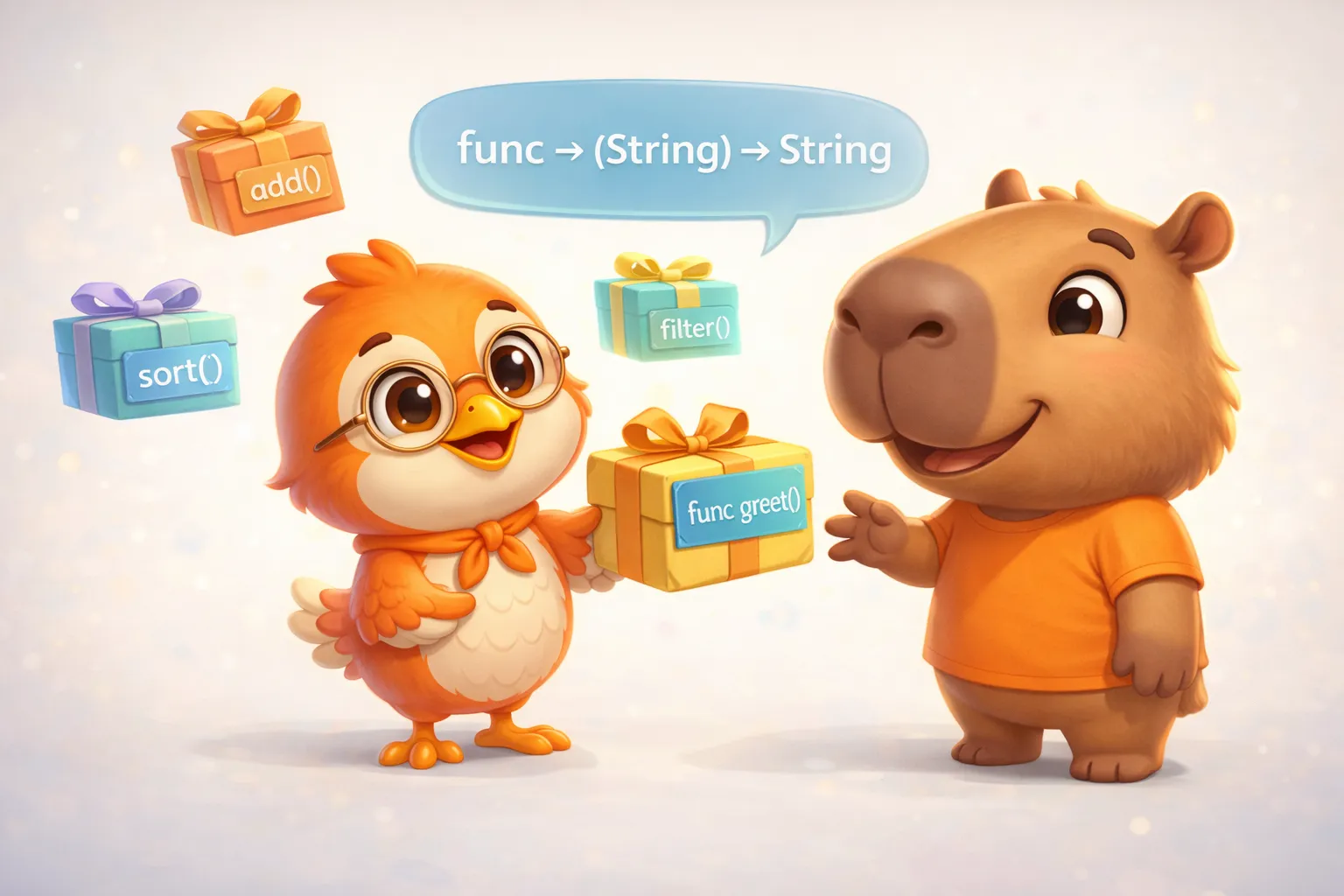
And no, I don’t mean “blocks of code that receive parameters and return a value.” You’ve known that since your first day programming. What makes functions special in Swift is that they’re first-class citizens — values you can store in variables, pass as parameters, and return from other functions. Exactly like an Int or a String.
Understanding this is the gateway to closures (article #6), functional programming (article #20), and the way Swift thinks.
In Swift, a function isn’t just something you execute — it’s a value you can manipulate. And that idea changes everything.
Defining and calling functions
The basic anatomy of a function in Swift, per the official documentation:
func greet(person: String) -> String {    let message = "Hello, " + person + "!"    return message}
print(greet(person: "Anna"))  // "Hello, Anna!"print(greet(person: "Brian")) // "Hello, Brian!"
Nothing surprising here. But let’s take apart each piece to understand the design decisions.
Implicit return
If your function body is a single expression, you can omit return:
func greet(person: String) -> String { "Hello, " + person + "!"}The compiler understands that the only expression is the return value. Same as writing return — no extra cost, just less visual noise.
Parameters and return values
No parameters
func sayHello() -> String { return "Hello, world"}No return value
func printGreeting(person: String) { print("Hello, \(person)!")}Technically, a function without a return value does return something: Void — which is simply an empty tuple ().
Multiple return values with tuples
func minMax(array: [Int]) -> (min: Int, max: Int)? {    if array.isEmpty { return nil }
    var currentMin = array[0]    var currentMax = array[0]
    for value in array[1..<array.count] {        if value < currentMin {            currentMin = value        } else if value > currentMax {            currentMax = value        }    }
    return (currentMin, currentMax)}
if let bounds = minMax(array: [8, -6, 2, 109, 3, 71]) {    print("min is \(bounds.min) and max is \(bounds.max)")    // "min is -6 and max is 109"}
Note the return type is (min: Int, max: Int)? — an optional tuple. If the array is empty, it returns nil. The labels min and max let you access values by name instead of .0 and .1.
Argument Labels and Parameter Names: why Swift has two names
This is one of Swift’s most distinctive design decisions. Each parameter has two names: an argument label (for the caller) and a parameter name (for the function body).
func greet(person: String, from hometown: String) -> String {    return "Hello \(person)! Glad you could visit from \(hometown)."}
// When calling, it reads like a sentence:greet(person: "Bill", from: "Cupertino")personis both label and parameter name (the default)fromis the argument label,hometownis the parameter name
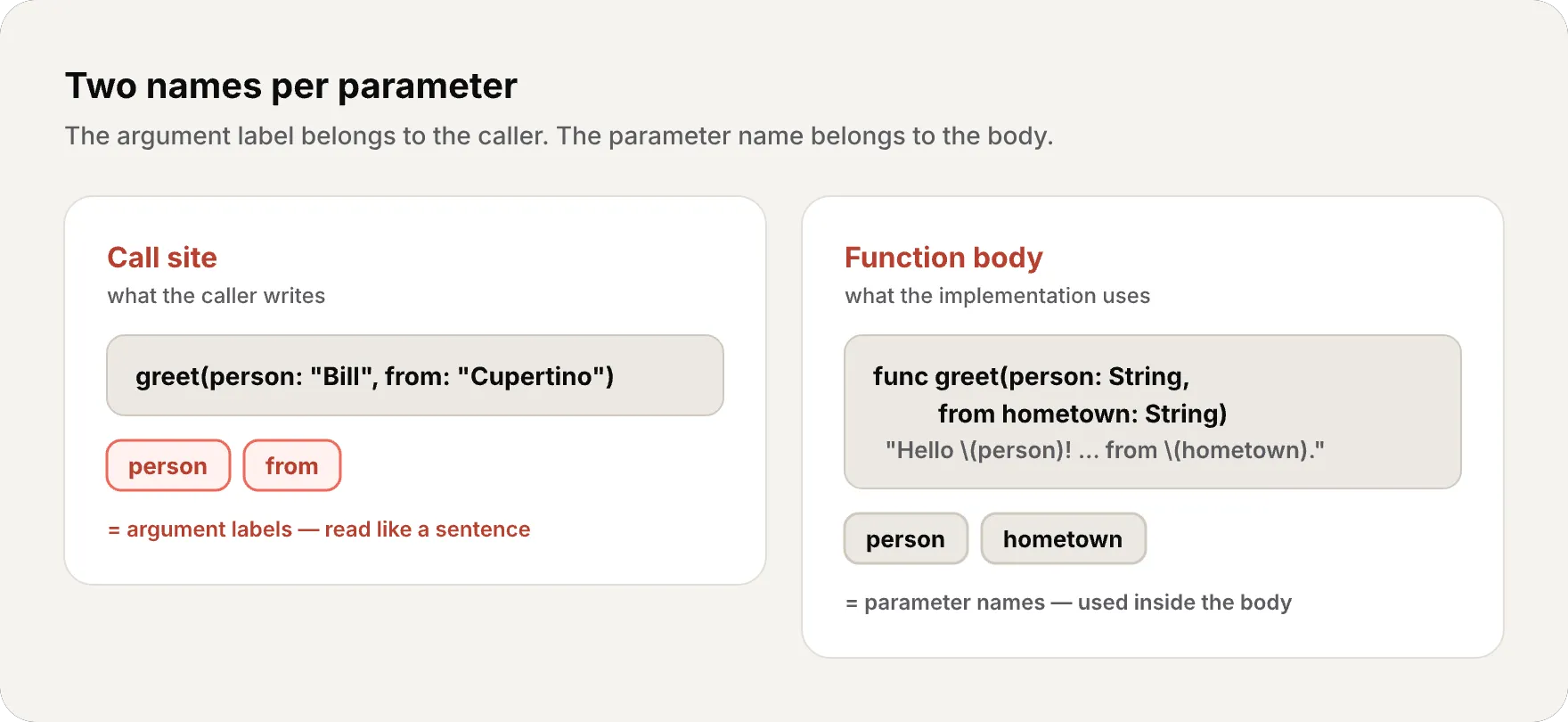
Why? Because Swift inherits Objective-C’s philosophy that function calls should read like English sentences. greet(person: "Bill", from: "Cupertino") reads naturally.
Omitting the label with _
func add(_ a: Int, _ b: Int) -> Int {    return a + b}
add(3, 5) // No labels — makes sense for math operations
Default values
func connect(to host: String, port: Int = 443, secure: Bool = true) {    print("Connecting to \(host):\(port) (secure: \(secure))")}
connect(to: "api.example.com")               // port=443, secure=trueconnect(to: "api.example.com", port: 8080)    // secure=trueconnect(to: "api.example.com", secure: false)  // port=443
Parameters with defaults go last. Default arguments are synthesized by the compiler and supplied at the call site — no extra overloads are generated. The default expression is evaluated at each call that omits it, so it’s essentially free for literals but not necessarily zero-cost (e.g., a default of Date() runs every time).
Variadic Parameters
func average(_ numbers: Double...) -> Double {    var total: Double = 0    for number in numbers {        total += number    }    return total / Double(numbers.count)}
average(1, 2, 3, 4, 5)  // 3.0average(3, 8.25, 18.75)  // 10.0
Inside the body, numbers is a [Double] — a regular array. The ... is syntactic sugar for the caller.
In-Out Parameters: modifying external values
By default, function parameters are constants — you can’t modify them. If you need the function to modify an external value, use inout:
func swapValues(_ a: inout Int, _ b: inout Int) {    let temp = a    a = b    b = temp}
var x = 3var y = 107swapValues(&x, &y)print("x is \(x), y is \(y)")// "x is 107, y is 3"
The & when passing the argument indicates the function can modify that variable. It’s explicit — no hidden mutations.
Function Types: functions as values
This is where things get interesting. Every function has a type defined by its parameters and return:
func addTwoInts(_ a: Int, _ b: Int) -> Int { a + b }func multiplyTwoInts(_ a: Int, _ b: Int) -> Int { a * b }
// Both functions have type: (Int, Int) -> Int
And you can use that type like any other type in Swift:
// Store a function in a variablevar mathFunction: (Int, Int) -> Int = addTwoIntsprint(mathFunction(2, 3))  // 5
// Reassign to another function of the same typemathFunction = multiplyTwoIntsprint(mathFunction(2, 3))  // 6
Assign different functions to the same variable and the result changes — but the type is always (Int, Int) -> Int:
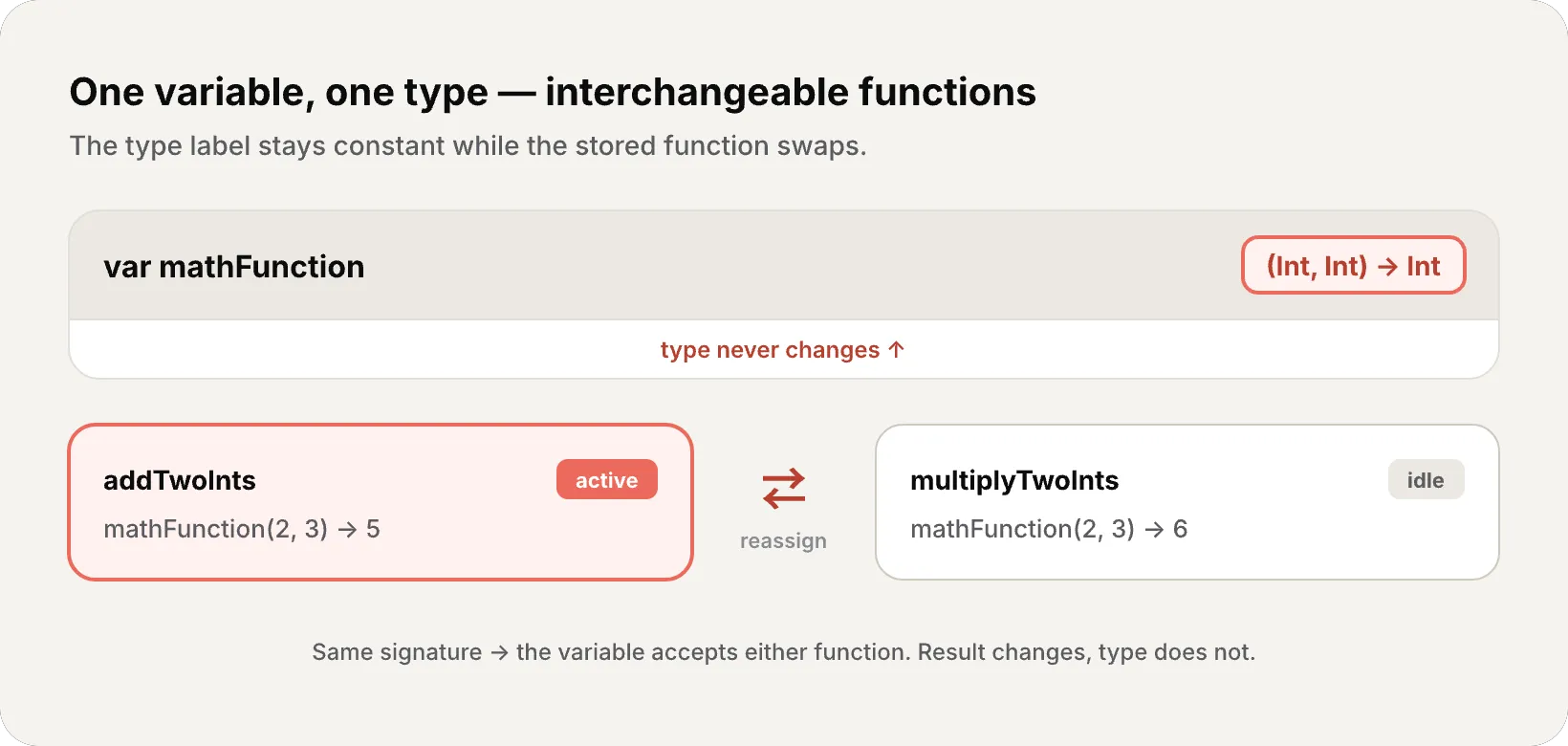
When a function fits in a variable, it stops being “something you execute” and becomes “something you manipulate.” That’s what being a first-class citizen means.
Functions as parameters
You can pass functions as arguments to other functions:
func printMathResult(_ operation: (Int, Int) -> Int, _ a: Int, _ b: Int) {    print("Result: \(operation(a, b))")}
printMathResult(addTwoInts, 3, 5)       // "Result: 8"printMathResult(multiplyTwoInts, 3, 5)  // "Result: 15"
printMathResult doesn’t know or care what operation does — it only knows it accepts two Ints and returns an Int. This is polymorphism (the same code working with many different behaviors) through function types — one of the pillars of functional programming.
Functions as return values
func stepForward(_ input: Int) -> Int { input + 1 }func stepBackward(_ input: Int) -> Int { input - 1 }
func chooseStepFunction(backward: Bool) -> (Int) -> Int {    return backward ? stepBackward : stepForward}
var currentValue = 3let moveNearerToZero = chooseStepFunction(backward: currentValue > 0)// moveNearerToZero IS now stepBackward
while currentValue != 0 {    print("\(currentValue)... ")    currentValue = moveNearerToZero(currentValue)}print("zero!")// 3... 2... 1... zero!
chooseStepFunction returns a function — not a value, but behavior. The return type (Int) -> Int is a function that takes an Int and returns an Int.
Nested Functions: closures in disguise
You can define functions inside functions:
func chooseStepFunction(backward: Bool) -> (Int) -> Int { func stepForward(input: Int) -> Int { input + 1 } func stepBackward(input: Int) -> Int { input - 1 } return backward ? stepBackward : stepForward}Nested functions are hidden from the outside world — only their enclosing function can see them. But when a nested function is returned outside its scope, it becomes something more powerful: a closure.
Why? Because it can capture (keep a reference to) variables from the surrounding scope so they stay alive after the outer function returns. And that has direct memory implications — which we’ll explore in depth in the next article.
The memory behind functions
Where does a function live?
The executable code of a function lives in the __TEXT segment of the Mach-O binary — as we saw in Mastering Instruments (Part 2). It’s read-only and shared between processes. When you call a function, the processor jumps to that memory address.
What happens on the stack?
Each function call creates a stack frame (as we saw with the interactive component in article #1):
- Parameters are copied to the stack frame (if they’re value types)
- Local variables are allocated in the stack frame
- On return, the stack frame is destroyed
Function types and the heap
When you store a function in a variable (like var mathFunction: (Int, Int) -> Int = addTwoInts), the variable on the stack stores a pointer to the function in __TEXT. That’s just 8 bytes — a pointer.
But when a function captures context (a nested function that uses variables from its parent scope), Swift needs something more complex: a closure context on the heap. This is what we’ll cover in detail in article #6.
inout and compiler optimization
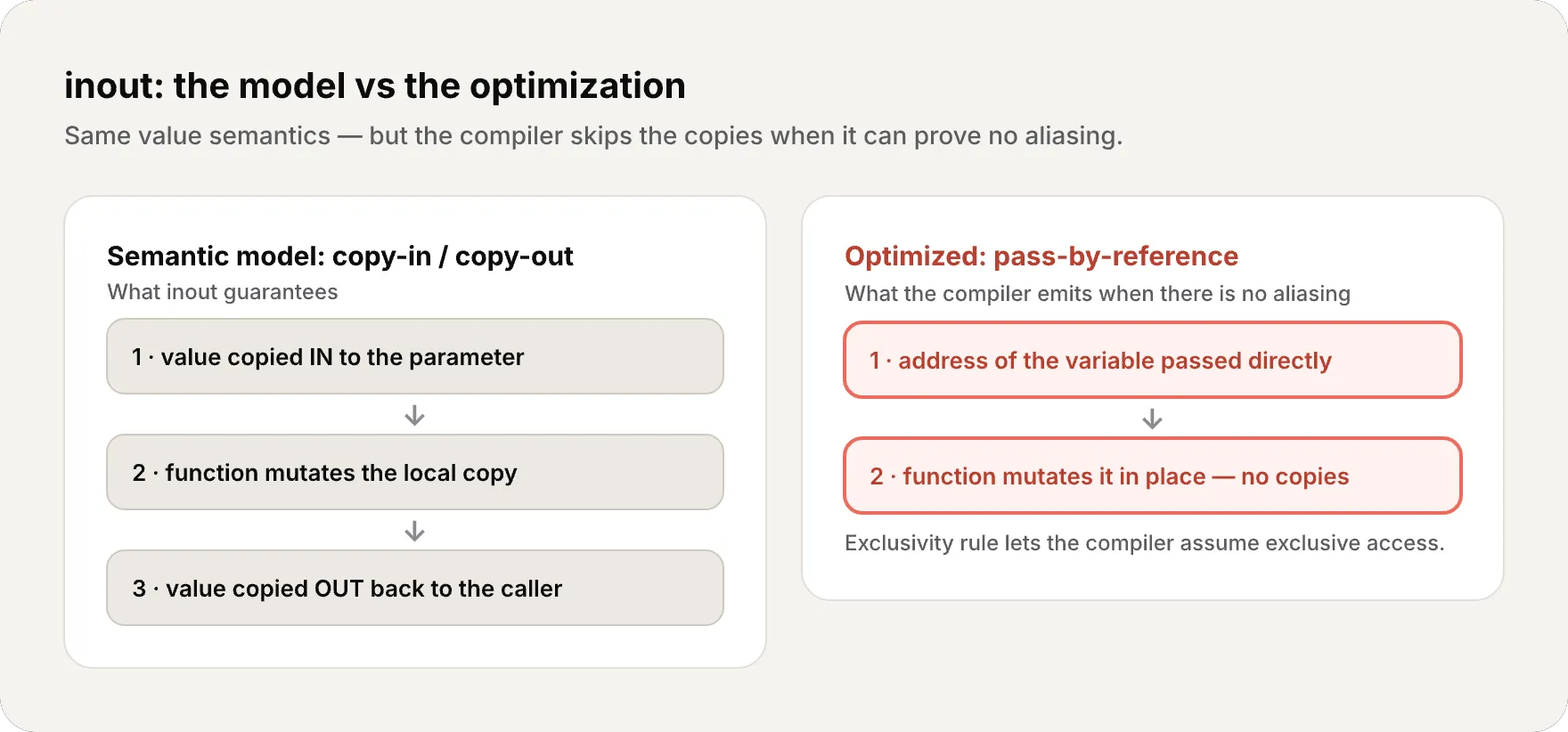
func increment(_ value: inout Int) { value += 1}Semantically it’s copy-in/copy-out. But the compiler generates:
- Pass-by-reference when it can prove there’s no aliasing
- Actual copy-in/copy-out only when the argument has no stable address (e.g., a computed property or subscript)
Swift’s exclusivity rule (only one access to a variable at a time — article #17) is what makes this optimization possible — the compiler can assume exclusive access thanks to the language’s rules.
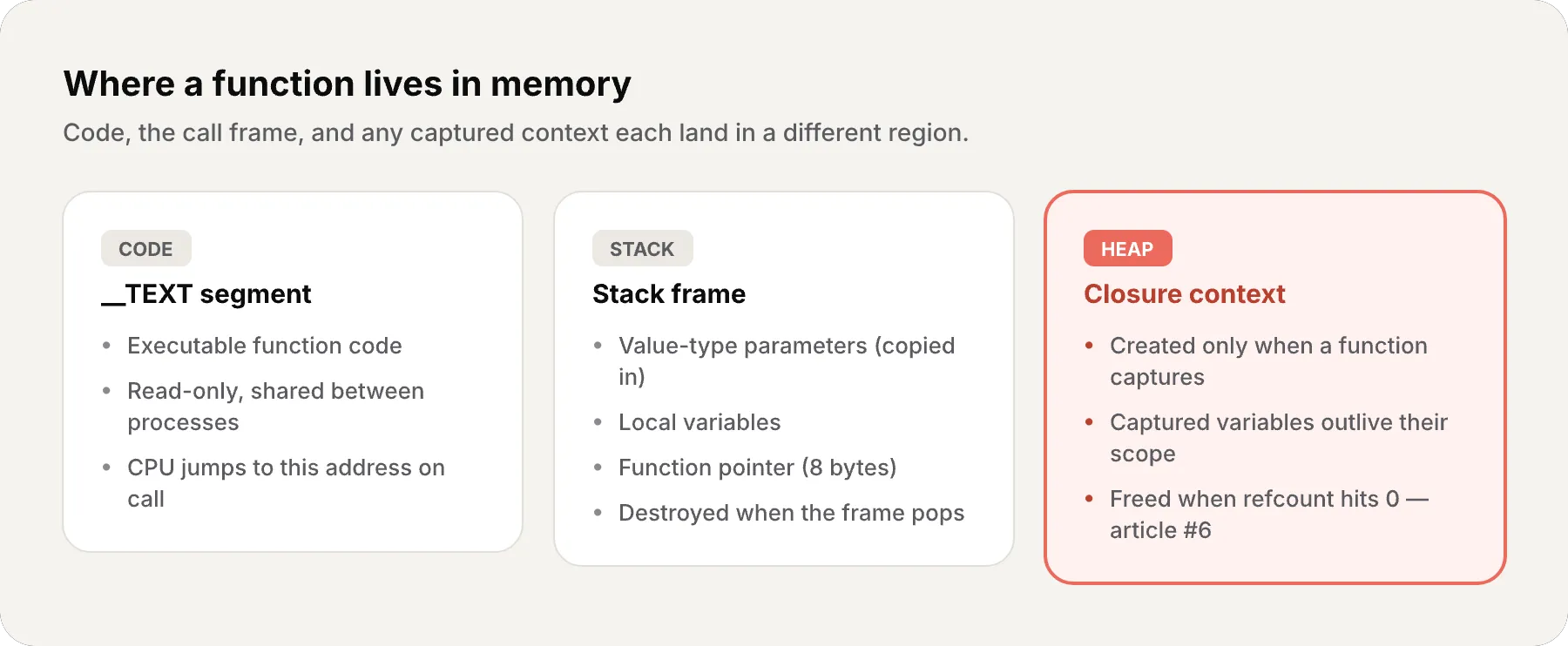
- Function code →
__TEXTsegment (read-only, shared) - Value type parameters → Stack (copied to frame)
- Local variables → Stack (destroyed on return)
- Function type in variable → Pointer on stack (8 bytes)
- Function capturing context → Heap (closure context) — article #6
- inout → Pass-by-reference optimized when no aliasing
The compiler as your ally
Swift’s compiler can do impressive things with functions:
- Inlining: if the function is small, the compiler copies its code directly into the call site, eliminating call overhead
- Constant folding: if arguments are compile-time constants, the compiler can calculate the result without generating a call
- Dead code elimination: if a function’s result isn’t used, the compiler can remove the call entirely (if it has no side effects — it doesn’t print, mutate external state, or do anything observable beyond returning a value)
- Specialization: for generic functions (generics — covered in a later article), the compiler generates specialized versions for each concrete type
A function isn’t just code — it’s a contract with the compiler. Parameter types, return type, absence of side effects: all of that is information the compiler uses to optimize.
Recap
Today we covered everything about functions in Swift:
- Basic definition —
func, parameters, return, implicit return - Parameters — no parameters, multiple parameters, tuple return, optional tuple return
- Argument labels — two names (label + parameter),
_to omit, sentence-like readability - Defaults and variadic — default values,
...for variable number of arguments - inout — modify external values, explicit
&, optimized pass-by-reference - Function types —
(Int, Int) -> Int, functions in variables, as parameters, as return values - Nested functions — functions inside functions, closures preview
- Memory — code in
__TEXT, parameters on stack, function pointers, inlining
What’s next
The next article is one of the most important in the entire series: Closures. We’ll explore what happens when a function captures variables from its environment — why that requires the heap, how capture lists work, what @escaping means, and why understanding closures is the key to mastering SwiftUI, Combine, and any modern Apple API.
If functions are first-class citizens, closures are their most powerful form.
See you next week.
Functions in Swift aren’t just tools for organizing code — they’re the fundamental unit of abstraction. When you understand that a function is a value, you start thinking in Swift the way Swift was designed to be thought in.
Related
-
- swift
- swift-zero-expert
- swift-fundamentals
Swift from Zero to Expert #15: Opaque & Boxed Protocol Types
The third door out of 'I don't want to name the concrete type'. some hides one concrete type while keeping its identity — no box, compile-time. any erases the type into a runtime box. This is how you finally return a protocol that has an associatedtype.
-
- swift
- swift-zero-expert
- swift-fundamentals
Swift from Zero to Expert #14: Generics
One swapTwoValues, one Stack<Element>, one findIndex — written once, working for every type. Generics let the caller pick the concrete type, the compiler specialize the code, and the box from #13 disappear. Array, Dictionary, Optional, and Result were generic all along.
-
- swift
- swift-zero-expert
- swift-fundamentals
Swift from Zero to Expert #13: Protocols
A protocol is a contract, not a class. It says what a type must do without saying what it is — and that single idea powers delegation, synthesized Equatable, existentials, and the protocol extensions that make Swift idiomatic.