Swift from Zero to Expert #7: Enumerations — more than a list of cases
Raw values, associated values, recursive enums with indirect, and how the compiler picks the minimal memory representation.
In the previous article we discovered that closures are reference types that live on the heap when they escape. Today we shift gears entirely: enumerations are value types that the compiler optimizes so aggressively they can be represented with just 2 bits.
If you come from C or Java, you probably think of enums as a list of named integers. In Swift, an enum is a sum type — meaning a value that is exactly ONE of several possible shapes at a time (north OR south, a UPC OR a QR code), known in type theory as a full algebraic type — with methods, computed properties, associated values of different types, protocol conformance, and even recursion. They’re one of the most expressive tools in the language, and understanding how the compiler represents them in memory will change how you design them.
A Swift enum is not a list of disguised integers — it’s a full algebraic type that the compiler can represent in as few as 2 bits.
Defining an enum — goodbye to the disguised integer
The most basic form:
enum CompassPoint { case north case south case east case west}Or on a single line:
enum CompassPoint { case north, south, east, west}The key insight: CompassPoint.north is not the integer 0. It’s a value of type CompassPoint:
var direction = CompassPoint.westprint(type(of: direction))  // CompassPoint — NOT Int
// When the type is already known, you can omit the enum namedirection = .eastBy convention, Swift enums use singular names (Planet, not Planets) and cases start with lowercase (north, not North).
Pattern matching and exhaustiveness
Enums shine with switch — and here Swift adds something C never had: mandatory exhaustiveness.
func describe(_ point: CompassPoint) -> String { switch point { case .north: return "Going up" case .south: return "Going down" case .east: return "Going right" case .west: return "Going left" } // No `default` needed — the compiler knows you covered every case}When you don’t need to cover every case, use if case or guard case:
let heading = CompassPoint.north
// if case — useful when you only care about one caseif case .north = heading {    print("Heading north!")}
// guard case — for early exitfunc navigate(_ point: CompassPoint) {    guard case .north = point else {        print("Not going north")        return    }    print("Full speed ahead!")}
CaseIterable — iterating over all cases
enum Beverage: CaseIterable {    case coffee, tea, juice, water}
print(Beverage.allCases.count)  // 4
for drink in Beverage.allCases {    print(drink)}// coffee, tea, juice, water
This is extremely useful for generating menus, SwiftUI pickers, or iterating over configuration options. Note that CaseIterable can only be automatically synthesized when no case has associated values — because with associated values, the possible values would be infinite.
Raw values — a fixed value for each case
Integers with auto-increment
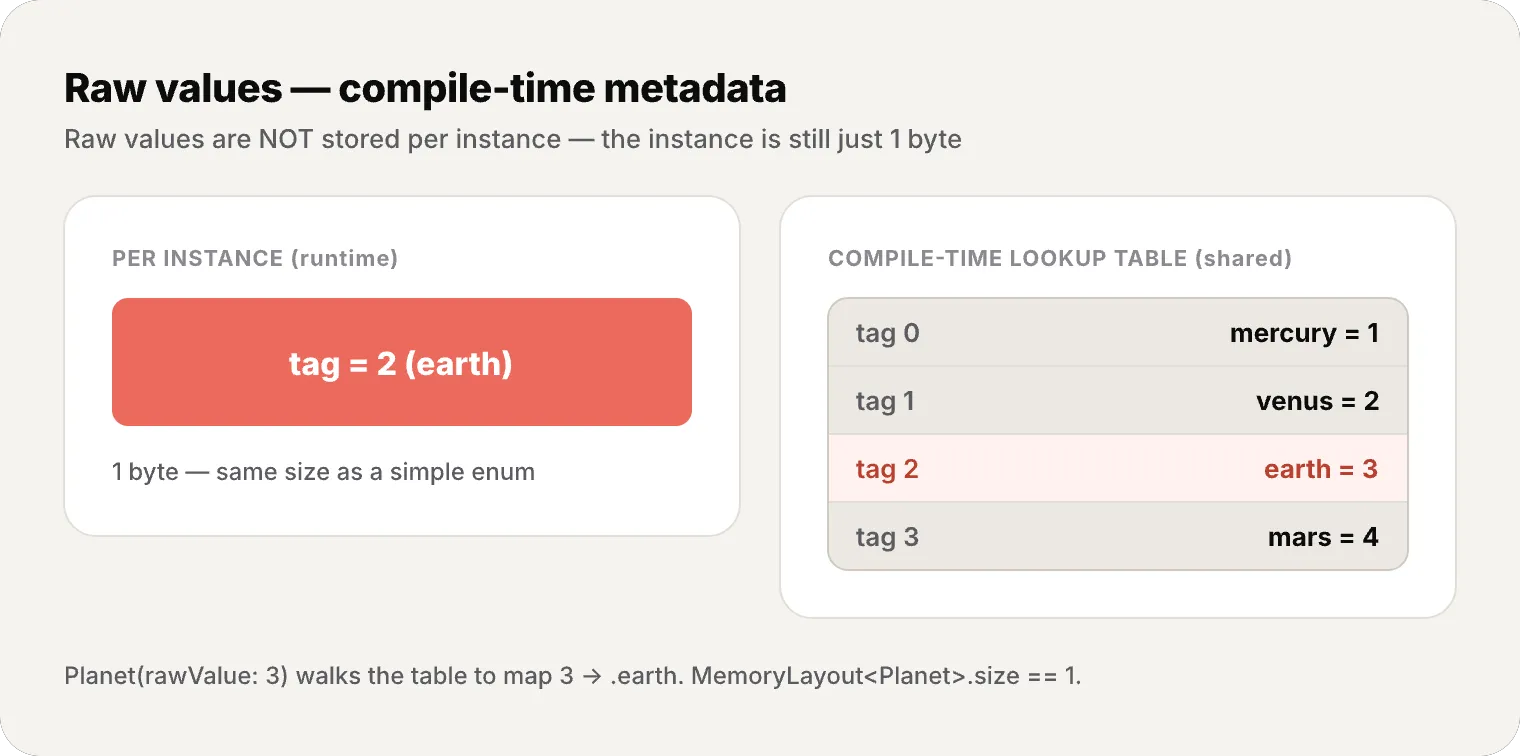
enum Planet: Int { case mercury = 1 case venus // 2 (auto) case earth // 3 (auto) case mars // 4 (auto) case jupiter // 5 (auto) case saturn // 6 (auto) case uranus // 7 (auto) case neptune // 8 (auto)}If you don’t assign an initial value, Swift starts at 0 for integers.
Implicit strings
enum HTTPMethod: String {    case get       // rawValue = "get"    case post      // rawValue = "post"    case put       // rawValue = "put"    case delete    // rawValue = "delete"}
print(HTTPMethod.get.rawValue)  // "get"
For strings, the implicit raw value is the case name.
Failable initializer
Every enum with raw values gets a failable initializer:
let possiblePlanet = Planet(rawValue: 3) // Optional<Planet> → .earthlet unknown = Planet(rawValue: 99) // nil — doesn't existThis connects directly with optionals, which we’ll explore in depth in article #11.
Associated values — each case tells its own story
This is where Swift enums completely separate themselves from any other language.
enum Barcode {    case upc(Int, Int, Int, Int)    case qrCode(String)}
var productBarcode = Barcode.upc(8, 85909, 51226, 3)productBarcode = .qrCode("ABCDEFGHIJKLMNOP")
A single type (Barcode) can store data in completely different shapes — 4 integers or a string. This is a sum type (or algebraic sum type) in type theory.
Extraction via pattern matching
switch productBarcode {case .upc(let numberSystem, let manufacturer, let product, let check):    print("UPC: \(numberSystem), \(manufacturer), \(product), \(check)")case .qrCode(let code):    print("QR: \(code)")}
// Shorthand: if all associated values use let (or all use var)switch productBarcode {case let .upc(numberSystem, manufacturer, product, check):    print("UPC: \(numberSystem), \(manufacturer), \(product), \(check)")case let .qrCode(code):    print("QR: \(code)")}
A more practical example
enum NetworkResponse {    case success(data: Data, response: HTTPURLResponse)    case failure(Error)    case loading(progress: Double)}
func handle(_ response: NetworkResponse) {    switch response {    case .success(let data, let response) where response.statusCode == 200:        print("OK — \(data.count) bytes")    case .success(_, let response):        print("Unexpected status: \(response.statusCode)")    case .failure(let error):        print("Error: \(error.localizedDescription)")    case .loading(let progress) where progress > 0.9:        print("Almost done! \(Int(progress * 100))%")    case .loading(let progress):        print("Loading: \(Int(progress * 100))%")    }}
Notice the where — you can filter within the same case to handle subcases. where adds an extra condition: the case only matches if its pattern fits AND the where test is true; otherwise Swift keeps checking the cases below. The combination of associated values + pattern matching + where clauses is incredibly powerful.

Recursive enums with indirect — when a case contains itself
What happens when an enum needs to refer to itself?
The classic example is an arithmetic expression:
indirect enum ArithmeticExpression { case number(Int) case addition(ArithmeticExpression, ArithmeticExpression) case multiplication(ArithmeticExpression, ArithmeticExpression)}You can put indirect on the whole enum or only on the recursive cases:
enum ArithmeticExpression { case number(Int) indirect case addition(ArithmeticExpression, ArithmeticExpression) indirect case multiplication(ArithmeticExpression, ArithmeticExpression)}And evaluate recursively:
func evaluate(_ expression: ArithmeticExpression) -> Int {    switch expression {    case .number(let value):        return value    case .addition(let left, let right):        return evaluate(left) + evaluate(right)    case .multiplication(let left, let right):        return evaluate(left) * evaluate(right)    }}
// (5 + 4) × 2let five = ArithmeticExpression.number(5)let four = ArithmeticExpression.number(4)let sum = ArithmeticExpression.addition(five, four)let product = ArithmeticExpression.multiplication(sum, .number(2))
print(evaluate(product))  // 18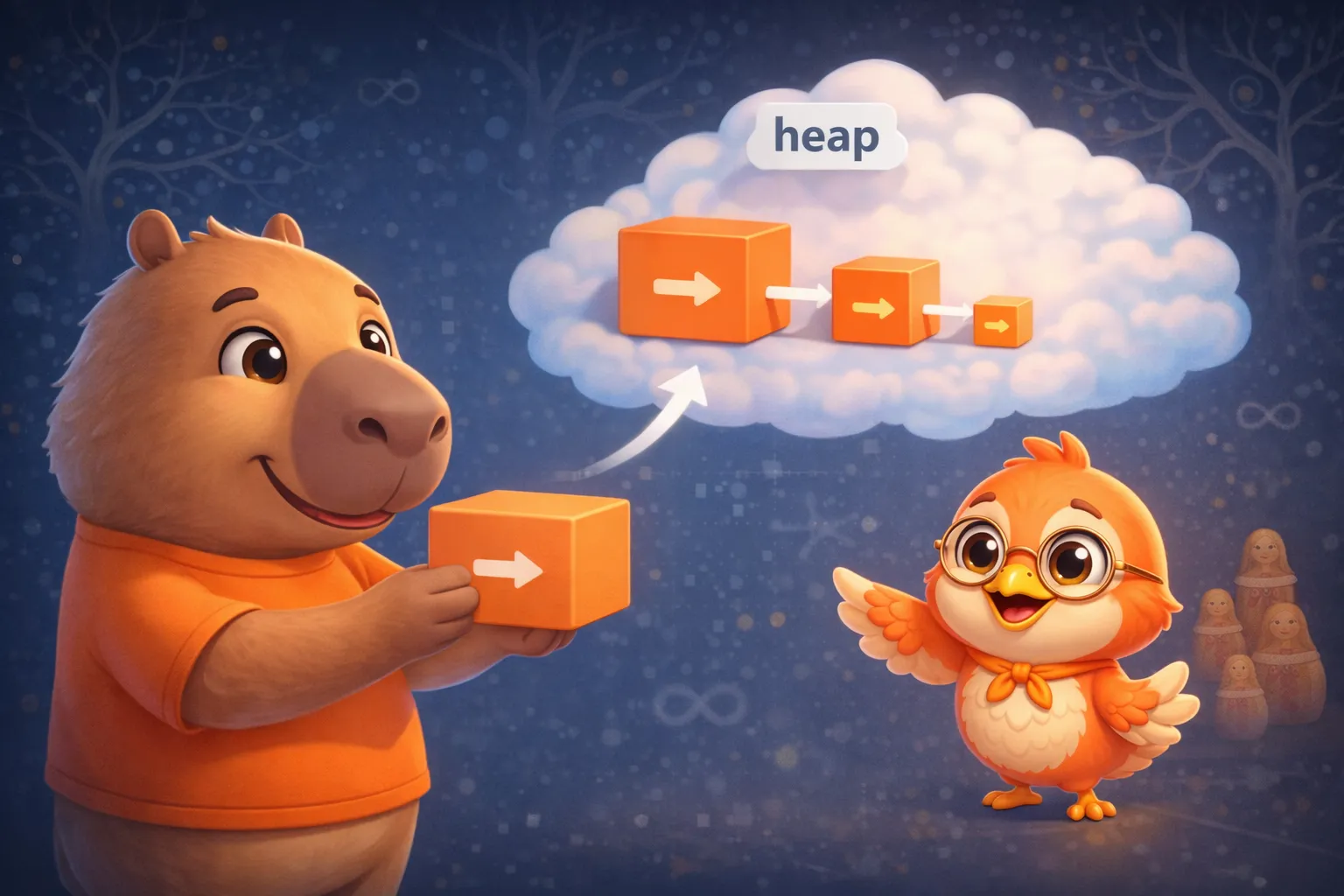
Remember from article #1 that value types live on the stack? A recursive enum needs to break that rule — the compiler inserts a heap pointer for cases marked as indirect. Without it, the compiler couldn’t calculate the type’s size: ArithmeticExpression would contain ArithmeticExpression which would contain ArithmeticExpression… infinitely.
Methods, computed properties, and initializers
Enums in Swift aren’t just constant containers — they’re full first-class types:
enum Planet: Int, CaseIterable {    case mercury = 1, venus, earth, mars, jupiter, saturn, uranus, neptune
    /// Surface gravity relative to Earth    var surfaceGravity: Double {        switch self {        case .mercury: return 0.378        case .venus:   return 0.907        case .earth:   return 1.0        case .mars:    return 0.377        case .jupiter: return 2.36        case .saturn:  return 0.916        case .uranus:  return 0.889        case .neptune: return 1.12        }    }
    /// Weight on this planet given weight on Earth    func weight(onEarth earthWeight: Double) -> Double {        return earthWeight * surfaceGravity    }}
let myWeight = Planet.mars.weight(onEarth: 70)print(myWeight)  // 26.39 kg on Mars
Mutating methods
Enums are value types, so methods that change self need mutating:
enum TrafficLight {    case red, yellow, green
    mutating func next() {        switch self {        case .red:    self = .green        case .green:  self = .yellow        case .yellow: self = .red        }    }}
var light = TrafficLight.redlight.next() // .greenlight.next() // .yellowlight.next() // .redProtocols and automatic synthesis
The Swift compiler can automatically synthesize conformance to several protocols for enums — conformance simply means the type satisfies the protocol’s checklist, and here the compiler writes that code for you:
// Equatable and Hashable — automatic for enums WITHOUT associated valuesenum Direction: Hashable {    case north, south, east, west}
let directions: Set<Direction> = [.north, .south]  // Works via synthesis
// With associated values — automatic IF all types conformenum Result: Equatable {    case success(Int)       // Int is Equatable ✓    case failure(String)    // String is Equatable ✓}
Result.success(42) == Result.success(42)  // trueResult.success(42) == Result.failure("err")  // false
Automatic Comparable (SE-0266)
enum Priority: Comparable {    case low, medium, high, critical}
let tasks: [Priority] = [.high, .low, .critical, .medium]print(tasks.sorted())  // [.low, .medium, .high, .critical]// Order follows declaration — the first case is the "smallest"
Codable with associated values (SE-0295)
Since Swift 5.5, the compiler synthesizes Codable for enums with associated values:
enum Barcode: Codable {    case upc(Int, Int, Int, Int)    case qrCode(String)}
let code = Barcode.qrCode("ABCDEF")let data = try JSONEncoder().encode(code)// {"qrCode":{"_0":"ABCDEF"}}
Unlabeled parameters get generated keys (_0, _1). If you want custom keys, you can declare CodingKeys per case.
The memory behind enums
Now let’s connect everything to our memory thread — the part that separates a developer who uses enums from one who understands them.
Minimal representation: tag bits
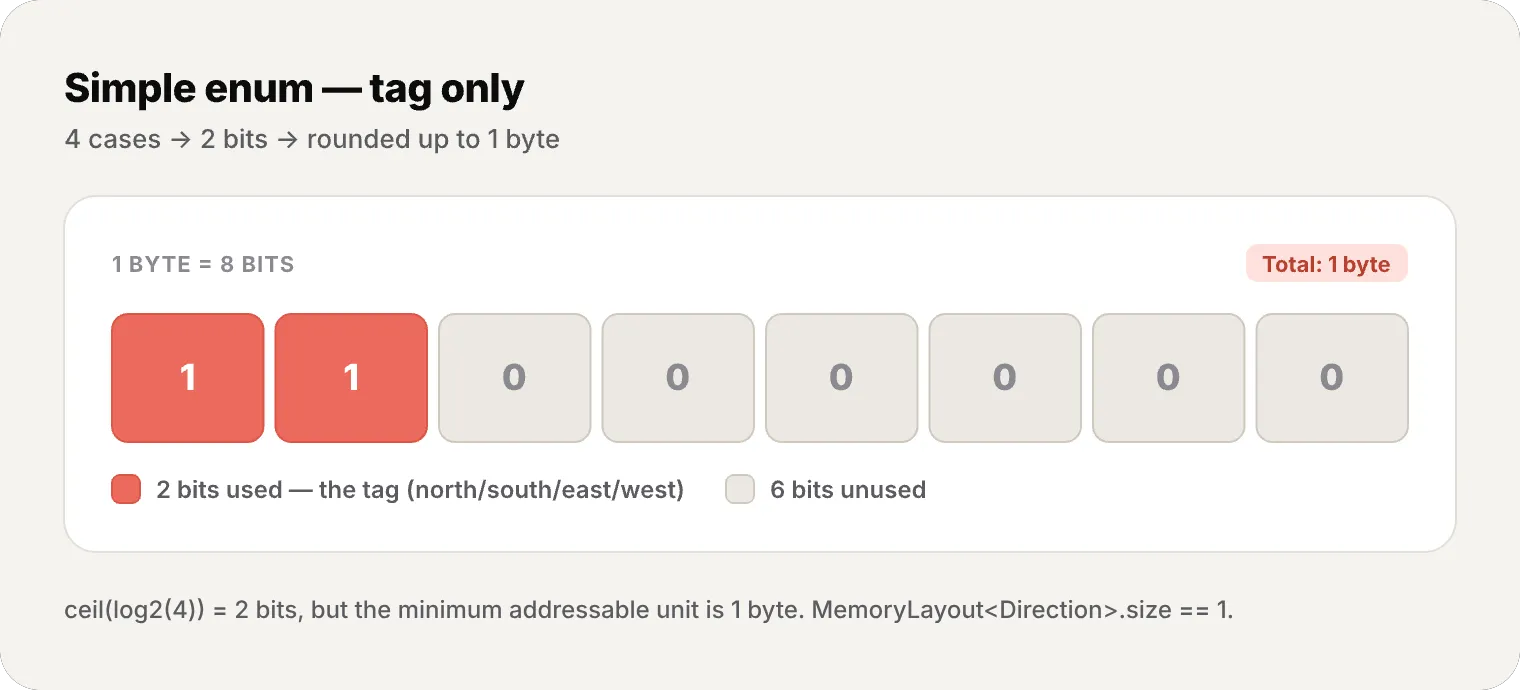
An enum without associated values or raw values stores only a tag (also called a discriminator) — a number identifying which case it is.
MemoryLayout<CompassPoint>.size // 1 byte// 4 cases → needs ceil(log2(4)) = 2 bits// But the minimum addressable unit is 1 byteThe compiler chooses the smallest possible representation:
- 2 cases → 1 bit, rounded to 1 byte
- 3-4 cases → 2 bits, rounded to 1 byte
- 5-256 cases → 3-8 bits, rounded to 1 byte
- 257+ cases → 2 bytes
- Empty enum (0 cases) → 0 bytes (uninhabitable type)
Associated values: the largest case wins
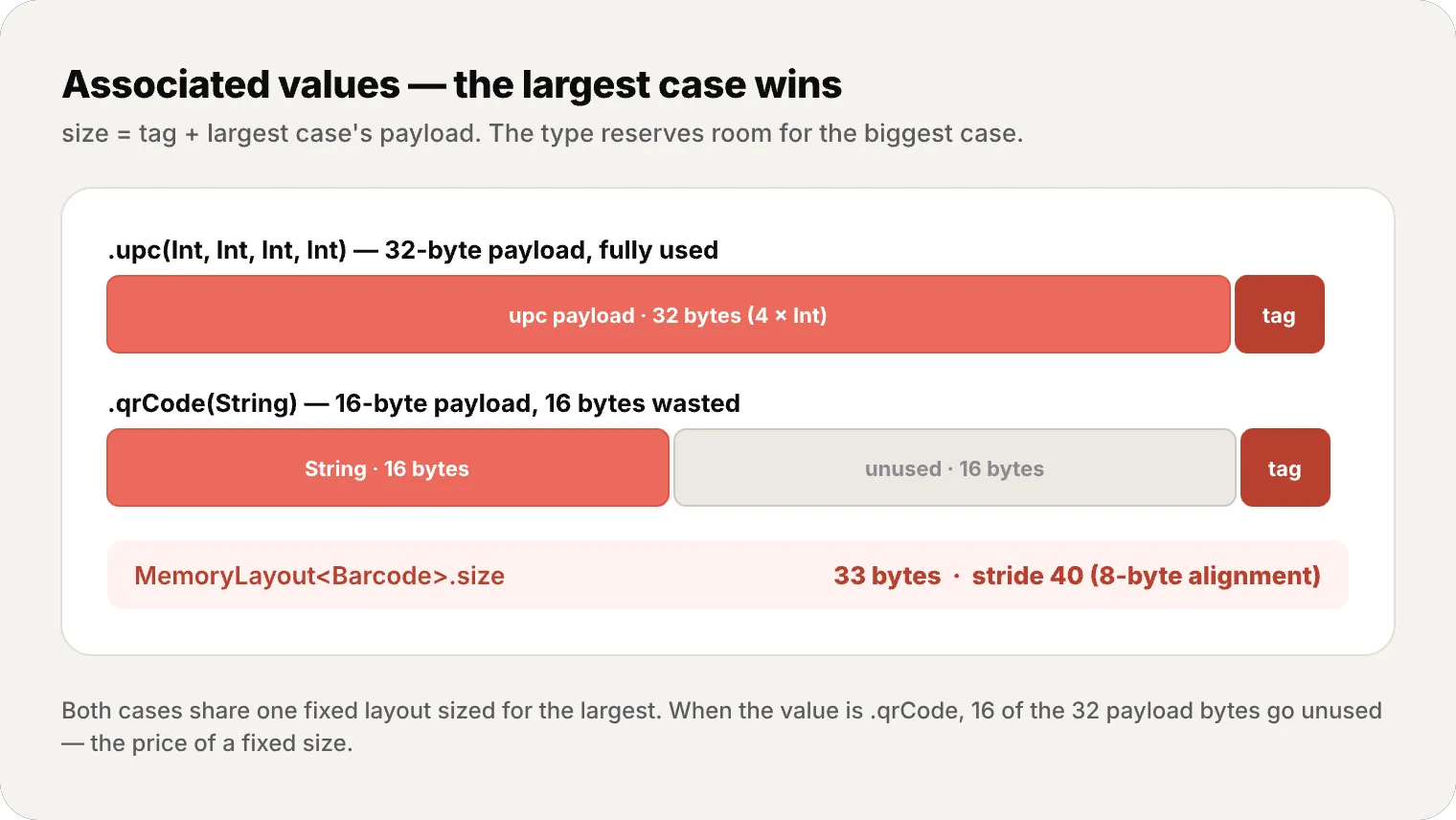
When the enum has associated values, the size is: tag + largest case’s payload.
enum Barcode {    case upc(Int, Int, Int, Int)  // 4 × 8 = 32 bytes payload    case qrCode(String)           // 16 bytes payload (String in Swift = 16 bytes inline)}
MemoryLayout<Barcode>.size       // 33 bytes (32 payload + 1 tag)MemoryLayout<Barcode>.stride     // 40 bytes (alignment to 8 bytes)
These exact figures aren’t language guarantees: on a 64-bit platform, current toolchains report 33/40 bytes here, but the numbers are platform- and toolchain-dependent implementation details. When Barcode is .qrCode, it uses 16 of the 32 payload bytes — the other 16 go unused. That’s the price of having a fixed size for the type.
Spare bit optimization
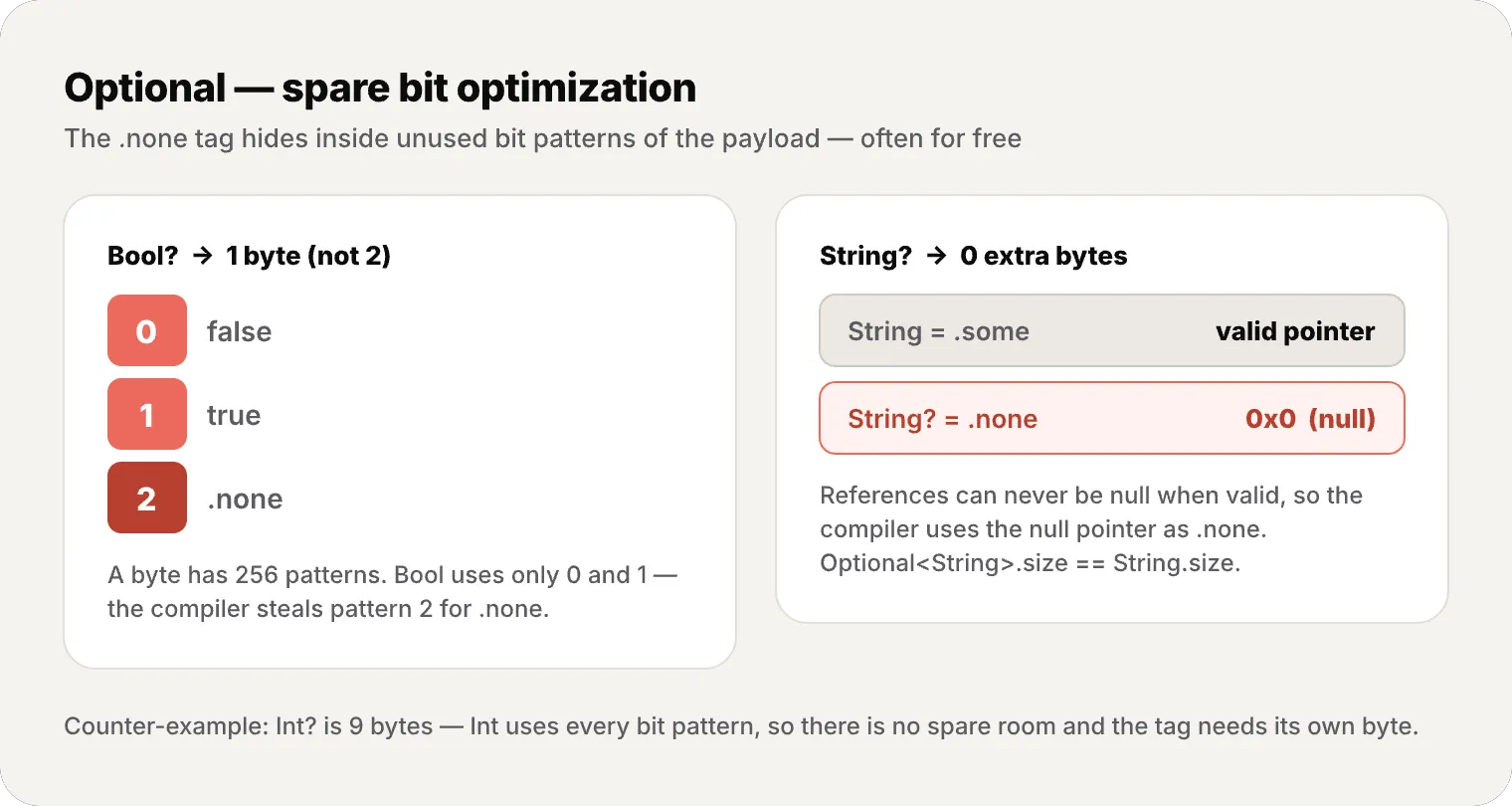
This is the compiler’s most elegant optimization. Optional<Bool> should take 2 bytes (1 for Bool + 1 for the Optional tag), but it takes only 1 byte:
MemoryLayout<Bool>.size // 1 byteMemoryLayout<Bool?>.size // 1 byte — not 2!How? Bool only uses two bit patterns: 0 (false) and 1 (true). A byte has 256 possible patterns — 254 go unused. The compiler uses pattern 2 to represent .none. The tag “hides” in the spare bits of the payload.
For reference types (classes), it’s even better: Optional<AnyObject> needs no extra bytes because the compiler uses the null pointer (0x0) to represent .none. That’s why Optional<String>.size == String.size — the tag is free.
indirect: the cost of the heap
When an enum uses indirect, each recursive case stores an 8-byte pointer to the heap instead of the value directly:
MemoryLayout<ArithmeticExpression>.size // 8 bytes (just the pointer)Without indirect, the compiler would need to calculate: size of ArithmeticExpression = size of ArithmeticExpression + size of ArithmeticExpression + … — an unsolvable equation. The pointer breaks the recursion and fixes the size.
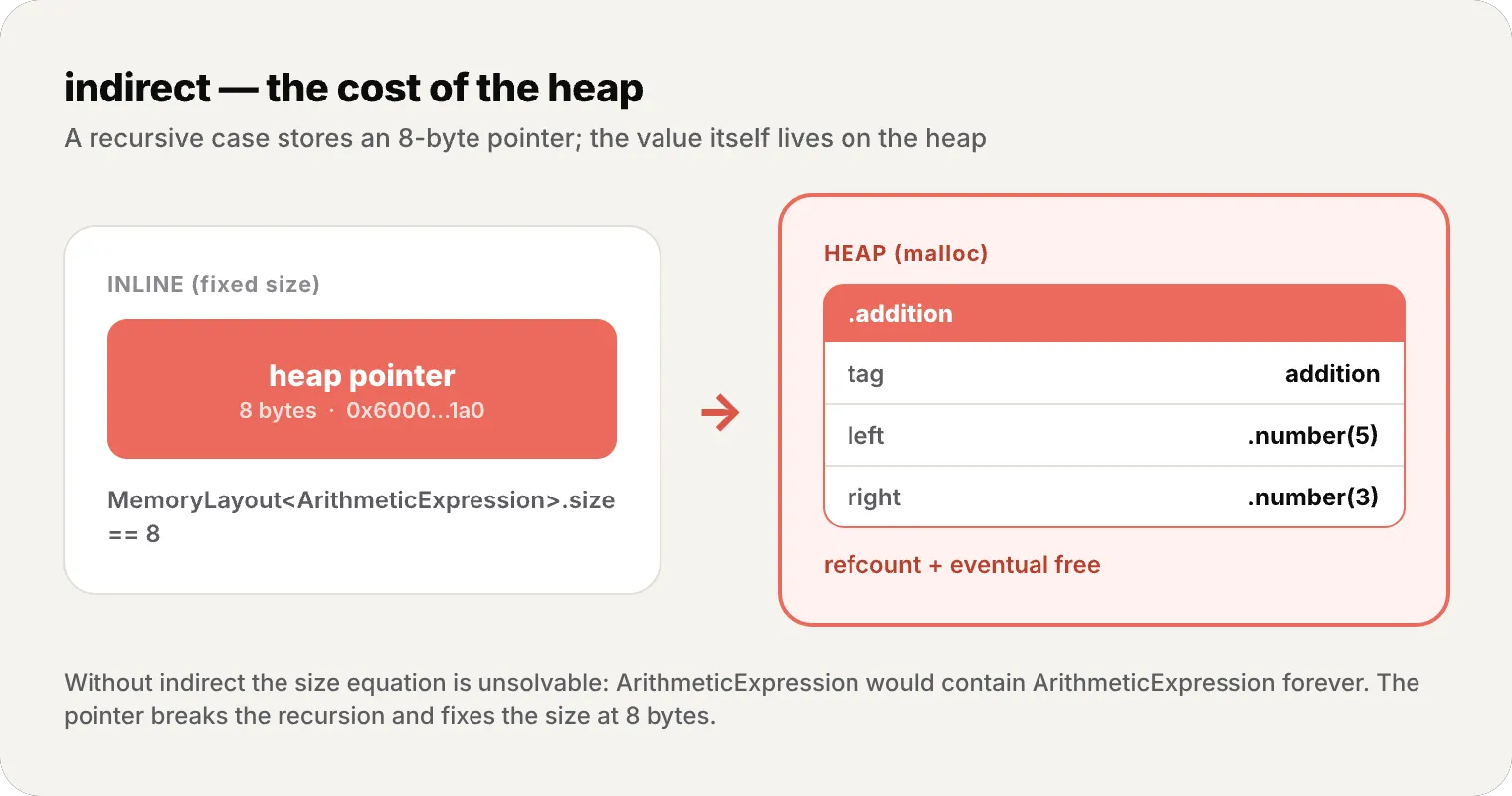
The cost: each recursive instance means a malloc to the heap, with its refcount and eventual free. It’s the same trade-off we saw with escaping closures in article #6.
The Swift compiler treats every bit as a scarce resource. A 4-case enum takes 1 byte. An Optional of a reference adds zero bytes. That obsession with efficiency isn’t accidental — it’s what makes Swift viable for embedded systems, wearables, and high-performance code.
Swift Evolution: advanced features
Enums continue evolving with each Swift version. These are the most important additions for advanced developers:
Noncopyable enums (~Copyable) — SE-0390
Since Swift 5.9, you can create enums that cannot be copied — useful for modeling exclusive resource ownership:
enum FileHandle: ~Copyable {    case open(descriptor: Int32)    case closed
    consuming func close() {        // After consuming, the value no longer exists        print("File closed")    }}
var handle = FileHandle.open(descriptor: 42)handle.close()  // consumes the value// handle is no longer usable here — the compiler guarantees it
Don’t worry about the ~ and consuming syntax now — it’s an advanced ownership feature you’ll meet later.
@nonexhaustive — SE-0487
For evolving libraries, you can mark an enum as extensible:
@nonexhaustive public enum APIError {    case unauthorized    case notFound    case serverError    // Future cases won't break user code}
// Users of your library must use @unknown defaultswitch error {case .unauthorized: handleAuth()case .notFound: show404()case .serverError: retry()@unknown default: handleUnknown()  // Catches future cases}
@c — SE-0495 (Swift 6.3)
For C interoperability:
@c enum Color: CInt { case red case green case blue}// Exported as a C enum in the compatibility headerRecap
Today we covered one of Swift’s most versatile types:
- Enums ≠ integers — they’re full value types with names, not disguised integers
- Pattern matching — exhaustive
switchwith value binding andwhere, plusif caseandguard case - CaseIterable — iterate over all cases with
.allCases - Raw values — fixed value per case (String, Int), with failable initializer, compile-time metadata
- Associated values — different data per case, extracted via pattern matching (sum types)
- Recursive enums (indirect) — heap allocation to break infinite size recursion
- Methods and properties — enums as first-class types, mutating to change
self - Protocol synthesis — automatic Equatable, Hashable, Comparable, Codable
- Memory — minimal tag bits, size = largest case, spare bit optimization, Optional is an enum
- Swift Evolution — ~Copyable, @nonexhaustive, @c for the future
What’s next
In the next article we explore Structs vs Classes — the decision that defines your app’s architecture. We’ll see value semantics vs reference semantics, why structs live on the stack and classes on the heap, memberwise initializers, and why Apple recommends structs by default. After understanding enums as value types, it’s the perfect time to compare the other two players.
See you next week.
Swift enumerations are full algebraic types — each case is a value with meaning, not a disguised integer. And the compiler knows it: it picks the minimal representation so your enum uses exactly the bytes it needs, not one more.
References
Related
-
- swift
- swift-zero-expert
- swift-fundamentals
Swift from Zero to Expert #15: Opaque & Boxed Protocol Types
The third door out of 'I don't want to name the concrete type'. some hides one concrete type while keeping its identity — no box, compile-time. any erases the type into a runtime box. This is how you finally return a protocol that has an associatedtype.
-
- swift
- swift-zero-expert
- swift-fundamentals
Swift from Zero to Expert #14: Generics
One swapTwoValues, one Stack<Element>, one findIndex — written once, working for every type. Generics let the caller pick the concrete type, the compiler specialize the code, and the box from #13 disappear. Array, Dictionary, Optional, and Result were generic all along.
-
- swift
- swift-zero-expert
- swift-fundamentals
Swift from Zero to Expert #13: Protocols
A protocol is a contract, not a class. It says what a type must do without saying what it is — and that single idea powers delegation, synthesized Equatable, existentials, and the protocol extensions that make Swift idiomatic.