
Swift from Zero to Expert #6: Closures — captures, memory, and functional power
Closure expressions, value capturing, capture lists, @escaping vs non-escaping, and why closures are reference types that live on the heap.
In the previous article we discovered that functions in Swift are first-class citizens — values you can store, pass, and return. Today we take the step that changes everything: closures.
If a function is a named block of code, a closure is a block of code that remembers. It remembers the variables that surrounded it when it was created, carries them wherever it goes, and can modify them even when the original scope no longer exists. That ability to “remember” has a technical name: capturing. And it has direct memory consequences every Swift developer needs to understand.
This is, probably, the most important article in the series so far.
A closure isn’t just an anonymous function — it’s a function with memory. And that memory has a real cost that lives on the heap.

What is a closure?
Before we look at syntax, we need a clear definition:
In Swift, there are three forms of closures — and you already know two:
- Global functions — have a name, don’t capture anything
- Nested functions — have a name, can capture from the parent scope (article #5)
- Closure expressions — have no name, can capture from their context
Global functions and nested functions are special cases of closures. When people say “closure” in Swift, they generally mean the third form: closure expressions.
Closure Expressions: the syntax
Let’s see how Swift simplifies the syntax step by step, using sorted(by:) as an example — directly from the official documentation:
let names = ["Chris", "Alex", "Ewa", "Barry", "Daniella"]We want to sort in reverse order. The most explicit way is with a function:
// 1. Full functionfunc backward(_ s1: String, _ s2: String) -> Bool { return s1 > s2}var reversed = names.sorted(by: backward)Now as a closure expression, step by step:
// 2. Closure with explicit typesreversed = names.sorted(by: { (s1: String, s2: String) -> Bool in    return s1 > s2})
// 3. Types inferred from contextreversed = names.sorted(by: { s1, s2 in return s1 > s2 })
// 4. Implicit return (single expression)reversed = names.sorted(by: { s1, s2 in s1 > s2 })
// 5. Shorthand argument namesreversed = names.sorted(by: { $0 > $1 })
// 6. Operator method — the shortest possible formreversed = names.sorted(by: >)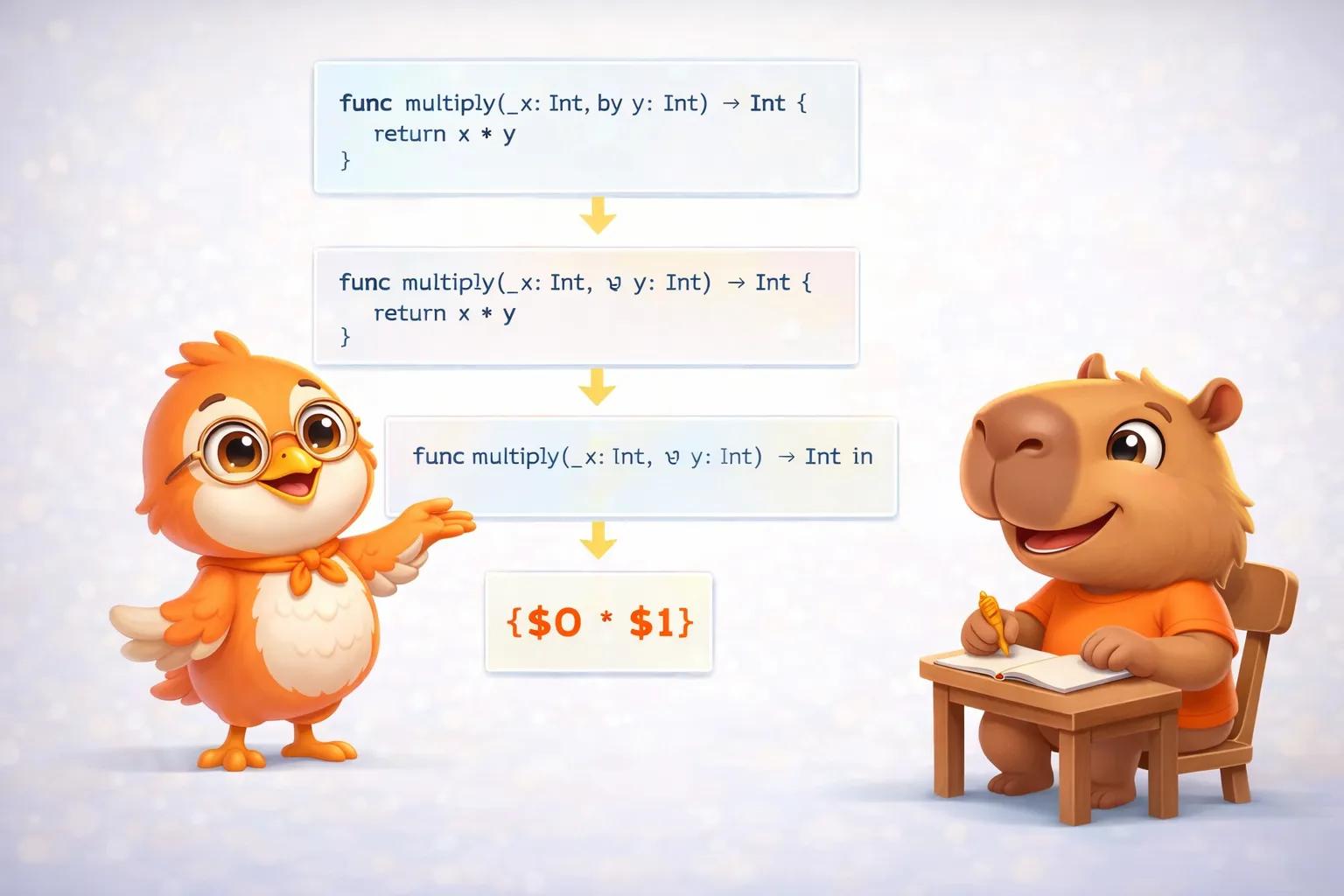
Six ways to write exactly the same thing. The compiler generates the same code for all of them — the difference is purely readability.
Trailing Closures
When a function’s last parameter is a closure, you can write it outside the parentheses:
// Without trailing closurenames.sorted(by: { $0 > $1 })
// With trailing closurenames.sorted { $0 > $1 }
If the closure is the only argument, you can omit the parentheses entirely. This is what makes SwiftUI’s syntax possible:
// SwiftUI uses trailing closures everywhereVStack { Text("Hello") Text("World")}// VStack.init(content:) takes a closure as its last parameterMultiple trailing closures
When a function takes more than one closure, you can use this syntax:
func loadPicture(    from server: Server,    completion: (Picture) -> Void,    onFailure: () -> Void) { /* ... */ }
// Multiple trailing closuresloadPicture(from: someServer) { picture in    someView.currentPicture = picture} onFailure: {    print("Download failed")}
The first closure goes without a label (trailing), the rest keep their labels.
Capturing Values: where the magic (and the cost) happen
This is where closures separate themselves from simple functions. A closure can capture constants and variables from the context where it was defined — and then use and modify them even after that context no longer exists.
Let’s look at the classic example from the official documentation:
func makeIncrementer(forIncrement amount: Int) -> () -> Int { var runningTotal = 0 func incrementer() -> Int { runningTotal += amount // captures runningTotal and amount return runningTotal } return incrementer}makeIncrementer returns a function (incrementer) that uses two variables from its parent scope: runningTotal and amount. When makeIncrementer finishes, its stack frame is destroyed — but those variables need to survive because incrementer uses them.
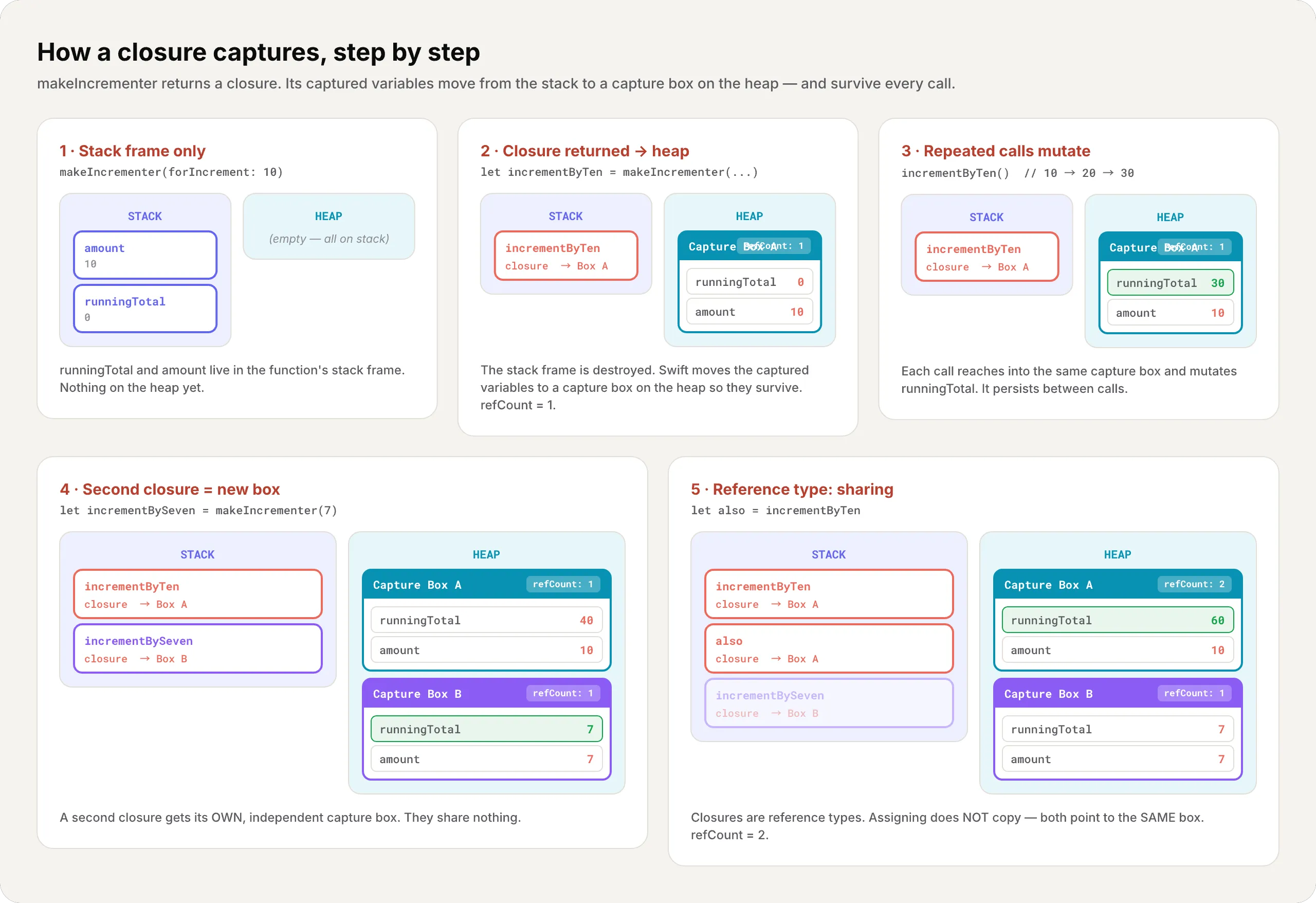
Swift solves this by moving runningTotal and amount to a capture box on the heap. The closure points to that box, and every time you call it, it accesses the variables there.
Step by step, here is how the captured variables move from the stack to a capture box on the heap:
let incrementByTen = makeIncrementer(forIncrement: 10)
incrementByTen()  // 10incrementByTen()  // 20incrementByTen()  // 30 — runningTotal persists between calls!
// A second closure has its OWN capture boxlet incrementBySeven = makeIncrementer(forIncrement: 7)incrementBySeven() // 7 — independent from incrementByTen
A closure doesn’t copy the variables it captures — it shares them. Each call to the closure accesses the same variables on the heap, and changes persist.
Closures Are Reference Types
If closures capture variables and live on the heap, what happens when you assign a closure to another variable?
let alsoIncrementByTen = incrementByTenalsoIncrementByTen() // 40incrementByTen() // 50 — the same runningTotal!Assigning a closure to another variable doesn’t copy it. Both variables point to the same closure with the same capture box. It’s like having two remote controls for the same TV.
This is fundamentally different from value types like Int or Array:
var a = 42var b = a    // b is a COPY — changing b doesn't affect ab += 1       // a is still 42
// But with closures:let c1 = incrementByTenlet c2 = c1  // c2 points to the SAME closure — no copy
@escaping vs non-escaping: the heap decision
This is one of the most confusing concepts — and the one with the biggest memory impact. Let’s define it clearly.
// Non-escaping (default) — executes within the functionfunc doWork(work: () -> Void) {    work()  // Executes here and dies}
// @escaping — survives after the functionvar savedClosures: [() -> Void] = []func saveForLater(closure: @escaping () -> Void) {    savedClosures.append(closure)  // The closure survives}
Why does this matter? Because of memory:
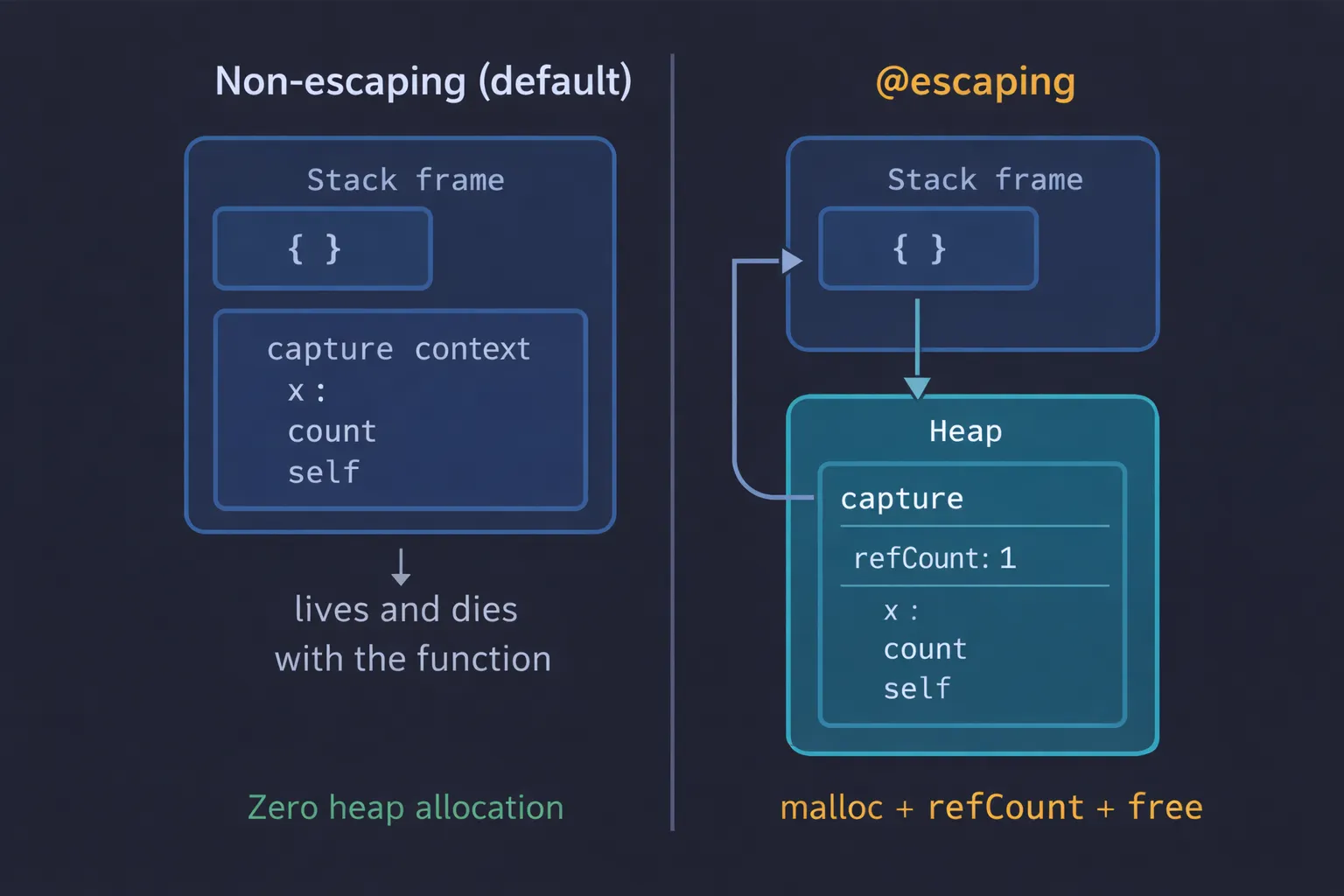
- Non-escaping: the compiler can allocate the closure and its capture context on the stack. When the function ends, everything is cleaned up automatically. Zero heap allocation.
- @escaping: the closure must live on the heap because it needs to survive. The capture context is allocated with
malloc, has a refcount, and is freed by ARC when there are no more references.
Capture Lists: controlling the capture
So far, captures have been automatic — Swift decides what to capture and how. But you can take explicit control with a capture list.
Capture by value vs by reference
var counter = 0
// Without capture list — captures by REFERENCElet byReference = { print(counter) }counter = 10byReference() // 10 — sees the current value
// With capture list — captures by VALUE (copy)counter = 0let byValue = { [counter] in print(counter) }counter = 10byValue() // 0 — has its own copy from the moment of capture![The capybara with a protective shield marked [weak self]](/_astro/capture-list.B48w34Ol_Z2rabY3.webp)
[weak self] and [unowned self]
These are the capture lists you’ll use most in real code:
class ViewController {    var label = "Hello"
    func setupTimer() {        // [weak self] — self can be nil        Timer.scheduledTimer(withTimeInterval: 1, repeats: true) { [weak self] _ in            guard let self else { return }            print(self.label)        }
// [unowned self] — I assume self ALWAYS exists // Crashes if self was deallocated someOperation { [unowned self] in print(self.label) } }}[weak self]→ When the closure can outlive the object. Example: timers, network requests, animations. The safe default choice.[unowned self]→ When you’re certain self will outlive the closure. Faster than weak (less bookkeeping for the runtime), but crashes if you’re wrong.[value]→ When you want to freeze the current value instead of capturing the reference.
Autoclosures: deferred evaluation
An autoclosure is a closure the compiler creates automatically to wrap an expression:
var customers = ["Chris", "Alex", "Ewa", "Barry"]
// Without autoclosure — you need the braces { }func serve(customer provider: () -> String) {    print("Serving \(provider())!")}serve(customer: { customers.remove(at: 0) })
// Now rewritten with @autoclosure (replaces the version above —// don't declare both in the same scope or you'll get a redeclaration error).// With @autoclosure — looks like a regular callfunc serve(customer provider: @autoclosure () -> String) {    print("Serving \(provider())!")}serve(customer: customers.remove(at: 0))// Looks like you're passing a String, but it's a closure// Evaluation is deferred until provider() is called
The ?? (nil-coalescing) operator we saw in article #1 uses @autoclosure for the default value — so it’s only evaluated if actually needed.
Higher-Order Functions: closures in action
This is where closures shine in real code — transforming collections:
let numbers = [1, 2, 3, 4, 5, 6, 7, 8, 9, 10]
// map — transform each elementlet doubled = numbers.map { $0 * 2 }// [2, 4, 6, 8, 10, 12, 14, 16, 18, 20]
// filter — select elements matching a conditionlet evens = numbers.filter { $0 % 2 == 0 }// [2, 4, 6, 8, 10]
// reduce — combine all elements into one valuelet sum = numbers.reduce(0) { $0 + $1 }// 55
// Chained — functional and expressivelet result = numbers    .filter { $0 % 2 == 0 }     // Only evens    .map { $0 * $0 }             // Square them    .reduce(0, +)                // Sum it all// 220
We’ll go deeper into these functions in article #19 on functional patterns. For now, the key point is that each one takes a closure as a parameter.
The memory behind closures
Time for the section that connects everything with our memory thread.
Anatomy of a closure in memory
A closure in Swift isn’t just a pointer to code. It’s a two-part structure:
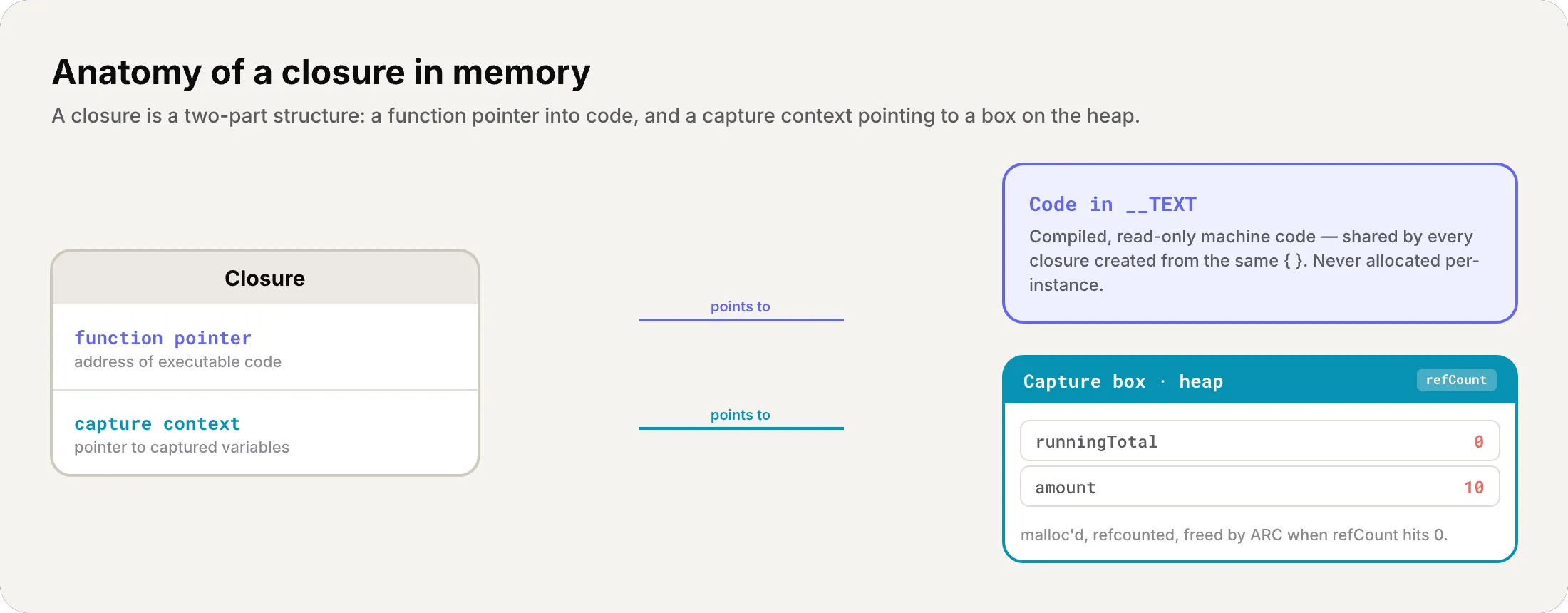
- Function pointer — points to executable code in
__TEXT(just like a regular function) - Capture context — points to the capture box on the heap where captured variables live
If the closure captures nothing (like a global function), the capture context is empty and there’s no heap allocation.
Non-escaping: the stack optimization
When the compiler knows a closure doesn’t escape, it can do something very smart: allocate the closure and its capture context on the stack instead of the heap.
// Non-escaping — the compiler allocates EVERYTHING on the stackfunc process(_ items: [Int], using transform: (Int) -> Int) -> [Int] {    return items.map(transform)}
let result = process([1, 2, 3]) { $0 * 2 }// The closure { $0 * 2 } NEVER touches the heap
This is huge for performance. No malloc, no refcount, no free. Everything is cleaned up automatically when the stack frame is destroyed.
@escaping: the cost of the heap
An escaping closure must live on the heap:
var completionHandlers: [() -> Void] = []
func addHandler(handler: @escaping () -> Void) {    completionHandlers.append(handler)    // handler survives — goes to the heap with its capture context}
Each escaping closure that captures variables implies:
mallocfor the capture box- refcount management (retain/release)
freewhen the last reference is released
The compiler optimizes aggressively
Swift’s compiler doesn’t stop there:
- Closure inlining: for closures passed to
map,filter,reduce— the compiler can copy the closure’s code directly into the loop, eliminating the indirection entirely - Stack promotion: if the compiler proves that an
@escapingclosure doesn’t actually escape in a specific case, it can promote it to the stack - Capture optimization: if a captured variable isn’t mutated, the compiler can capture a copy instead of a reference (avoiding the capture box)
- Non-escaping closure without captures → Zero cost, can live in registers (CPU registers — fastest storage)
- Non-escaping closure with captures → can be stack-allocated (typically zero heap cost)
- @escaping closure → Mandatory heap allocation (capture box + refcount)
- Closures in map/filter/reduce → The compiler can inline, eliminating overhead
- Each capture box → malloc + refcount + eventual free
- Closures are reference types → Assign = share, not copy
Non-escaping by default isn’t a restriction — it’s a gift from the compiler. You’re telling it “you can put this on the stack,” and the compiler thanks you with zero allocations.
Recap
Today we covered one of Swift’s deepest concepts:
- Closures = functions + captured context — three forms: global, nested, expressions
- Evolving syntax — from full function to
>in 6 steps, all generate the same code - Trailing closures — the syntax that makes SwiftUI possible
- Capturing values — outer scope variables move to a capture box on the heap
- Reference types — assigning a closure = sharing, not copying
- @escaping vs non-escaping — non-escaping lives on the stack (free), escaping on the heap (cost)
- Capture lists —
[weak self],[unowned self], capture by value - Autoclosures — automatic deferred evaluation
- Higher-order functions —
map,filter,reduceas closures in action - Memory — function pointer + capture context, inlining, stack promotion
What’s next
In the next article we’ll explore Enumerations — which in Swift are much more than a list of cases. We’ll see raw values, associated values, recursive enums with indirect, and how the compiler chooses the most efficient memory representation. If you’re coming from other languages, Swift’s enums will surprise you.
See you next week.
Understanding closures is understanding how Swift thinks. Every time you write , you’re creating a block of code that can remember its environment, travel to another scope, and execute whenever needed. That power has a memory cost — and now you know exactly what it is.
Related
-
- swift
- swift-zero-expert
- swift-fundamentals
Swift from Zero to Expert #15: Opaque & Boxed Protocol Types
The third door out of 'I don't want to name the concrete type'. some hides one concrete type while keeping its identity — no box, compile-time. any erases the type into a runtime box. This is how you finally return a protocol that has an associatedtype.
-
- swift
- swift-zero-expert
- swift-fundamentals
Swift from Zero to Expert #14: Generics
One swapTwoValues, one Stack<Element>, one findIndex — written once, working for every type. Generics let the caller pick the concrete type, the compiler specialize the code, and the box from #13 disappear. Array, Dictionary, Optional, and Result were generic all along.
-
- swift
- swift-zero-expert
- swift-fundamentals
Swift from Zero to Expert #13: Protocols
A protocol is a contract, not a class. It says what a type must do without saying what it is — and that single idea powers delegation, synthesized Equatable, existentials, and the protocol extensions that make Swift idiomatic.